

Short answer
Before you start
- A BotRix account already linked to Kick
- Access to your Kick channel chat, so you can send /mod botrix
- If you've never set up BotRix, start with the Kick chatbot guide and come back here when something breaks
- Optional: a second account or a friend in chat to test commands as a viewer
Bring your setup to a 24/7 AI Streamer Coach
Ask Streamer Coach →Get personalized feedback to fix streaming issues and plan your next content.
Step by step
- 01
Problem 1, the bot doesn't reply: switch on the chatbot and pick Kick
Nicole Rojas | YouTube | 0:40 ↗You set everything up, type !discord, and BotRix leaves you on read. Rude. Go to Chat Bot and make sure the switch at the very top, next to Chat Bot, is on. Then check that the top left corner says Plataforma: Kick. If the chatbot is enabled for another platform, it won't answer anything on Kick.
What you should see: The Chat Bot switch is green and the top left corner reads Plataforma: Kick.
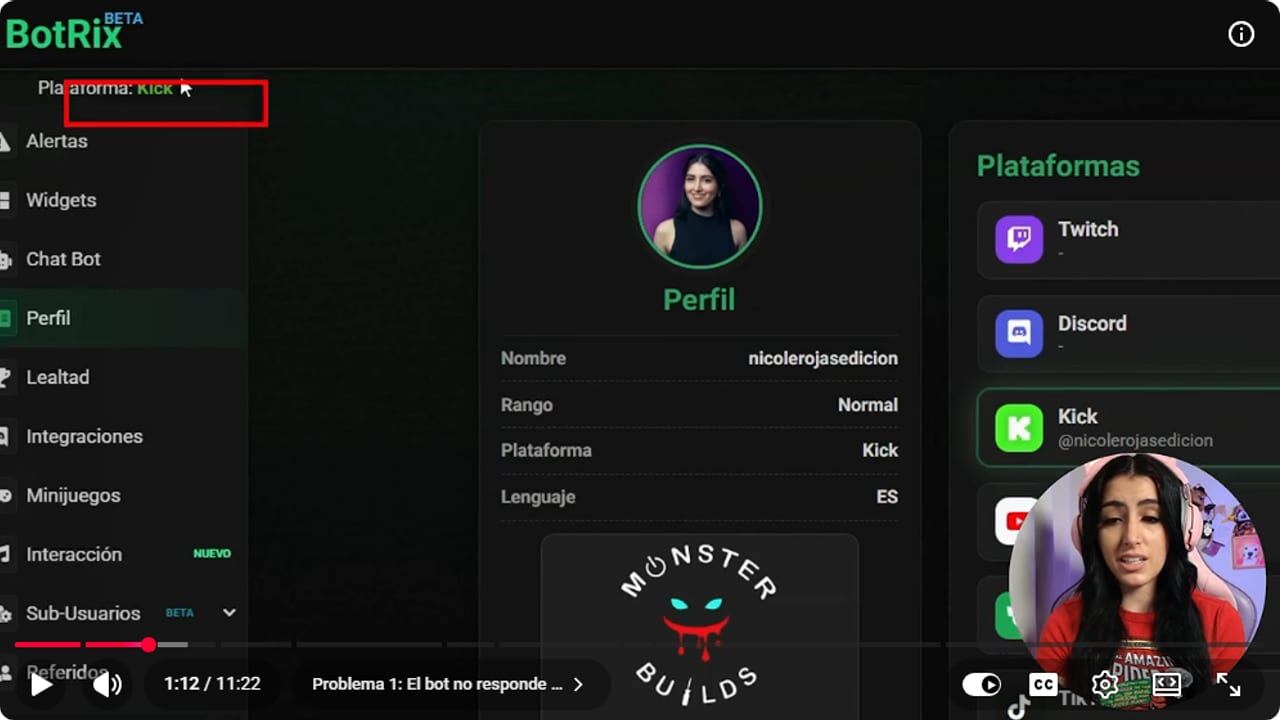
Check that the top left says Plataforma: Kick. If it shows another platform, the bot won't answer on Kick. YouTube · 1:13 ↗ - 02
Make BotRix a moderator from your Kick chat
Nicole Rojas | YouTube | 0:55 ↗BotRix even reminds you with a little yellow banner in Chat Bot. Copy the command /mod BotRix, go to your stream chat on Kick, paste it and send it. Without the moderator role, BotRix can't post in your chat.
What you should see: Kick shows the notice ¡BotRix ha sido agregado como moderador! under the chat box.
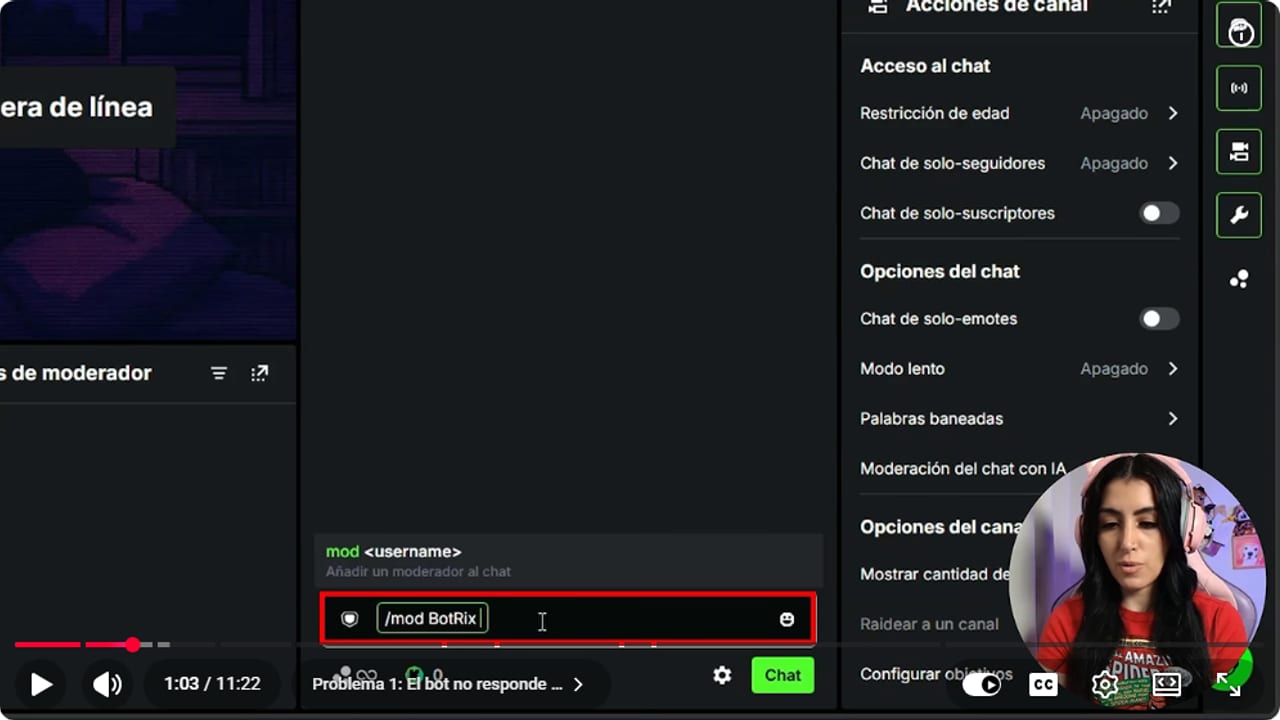
Type /mod BotRix in your channel chat and send it. Kick confirms it was added as a moderator. YouTube · 1:04 ↗ - 03
Just connected it? Give it the sync hour
Nicole Rojas | YouTube | 1:20 ↗If you've done all of this a thousand times and it's still silent, nothing may actually be broken. When you connect BotRix and go live right away, it sometimes needs about an hour to sync your account with its bot and chat. Wait that hour before changing anything else. If more than an hour has passed, or it's been days, move on to problem 2.
What you should see: After the hour, you send !discord in chat and BotRix answers with your message.
- 04
Problem 2, it suddenly stopped working: sign out of BotRix
Nicole Rojas | YouTube | 2:32 ↗It worked fine, then one day commands and timers just stop. Usually the token linking BotRix to your Kick account has expired. That happens when you change your password, when Kick logs you out for security, or when a Kick update asks for new permissions. You didn't break anything. Click your avatar in the top right of BotRix and choose Cerrar sesión (Sign out). Then open Kick and check you're logged in with the account you stream on. With several accounts it's easy to link the wrong one, and I've done it too. Close the BotRix tab.
What you should see: BotRix shows its sign-in screen, and Kick shows the name of the account you'll stream from at the top.
- 05
Sign back in with Kick and grant permissions again
Nicole Rojas | YouTube | 3:01 ↗Open BotRix again and sign in with Kick. It asks for authorization one more time, so allow access. Check Kick is selected, open Chat Bot, confirm the switch is on and send /mod BotRix in your chat like in step 2. That gives you a fresh token. The sync hour can apply here too.
What you should see: Kick confirms again that BotRix was added as a moderator, and the BotRix chatbot shows as on.
- 06
Problem 3, replies come a minute late: reconnect the chatbot
Nicole Rojas | YouTube | 4:22 ↗Someone types !discord and the answer takes almost a minute to arrive. That means BotRix and Kick are out of sync. Go to Chat Bot and switch off the toggle at the top. Refresh the page, wait between 15 seconds and a minute, then switch it back on. BotRix tells you it will join your channel. Refresh once more.
What you should see: The Chat Bot switch is green again and a test command gets answered within a few seconds.
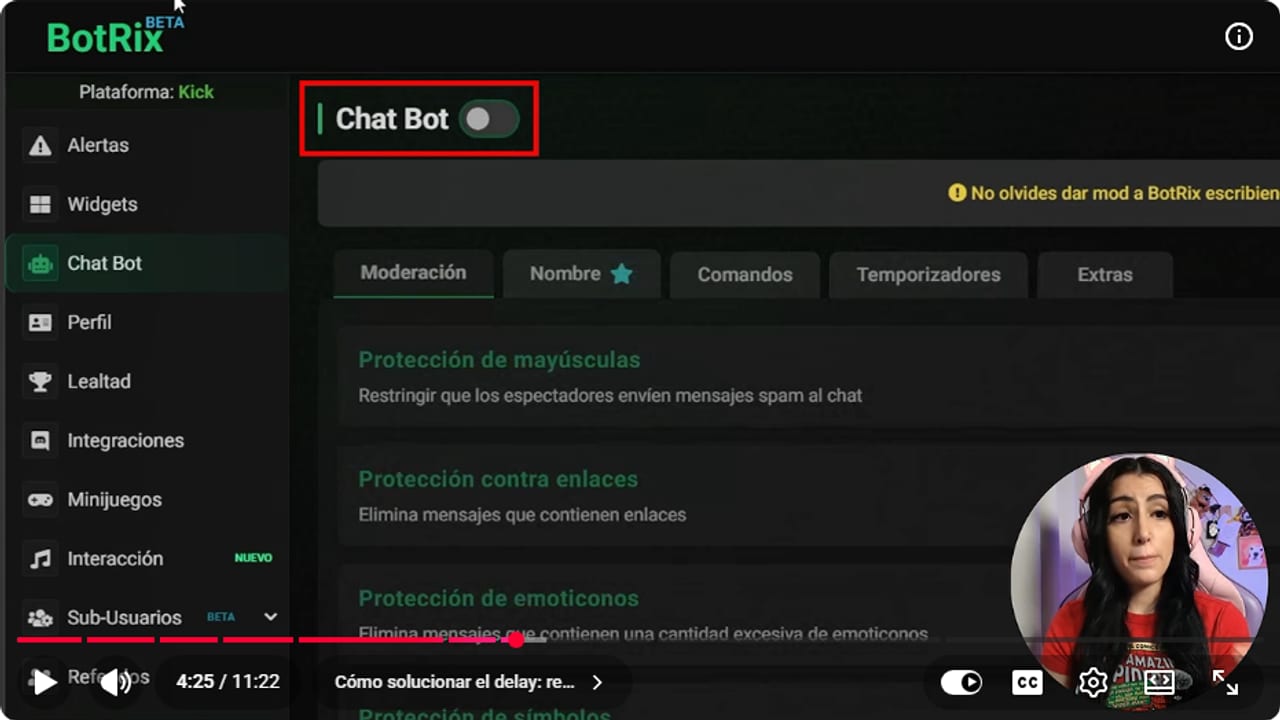
To clear the delay, switch this off, refresh, wait a moment and switch it back on. YouTube · 4:25 ↗ - 07
Still slow? Turn off modules you don't use
Nicole Rojas | YouTube | 4:46 ↗Every active module adds a bit of delay. Go to Chat Bot, Extras, and turn off the levels system and the points system if you don't use them. Do the same with chat alerts, timers and any commands you turned on and never use. Replies should take under 10 seconds. If your chat is very busy, BotRix has a paid plan with faster replies and better stability, or you can look at a different bot.
What you should see: Only the modules you actually use stay on in Extras, and commands answer in under 10 seconds.
- 08
Problem 4, some commands work and others don't: check they're enabled
Nicole Rojas | YouTube | 5:43 ↗Your !discord works but the default commands don't. Go to Chat Bot, Comandos, Predeterminados (Default) and check each one is enabled. If one has an exclamation mark, like the level command, it needs another permission set up before it will reply. Also open the command with the pencil icon. There's a second Activado switch inside, and if that one is off while the list shows green, that's your conflict.
What you should see: The command shows as enabled in the list and inside its edit window, with no exclamation mark.
- 09
Check the command's rank and cooldown
Nicole Rojas | YouTube | 6:25 ↗Open the command with the pencil and look at Rango (Rank). If it ended up on VIP or Subscriber by accident, only those people and higher ranks can use it. For something like !discord, set it to everyone. Then scroll to the cooldown. If you typed 60 minutes instead of 10 seconds, the command fires once and then nobody sees it for an hour, no matter how many times they type it. Click Confirmar.
What you should see: In Mis Comandos, the Rango column says Todos and the command fires again shortly after it's used.
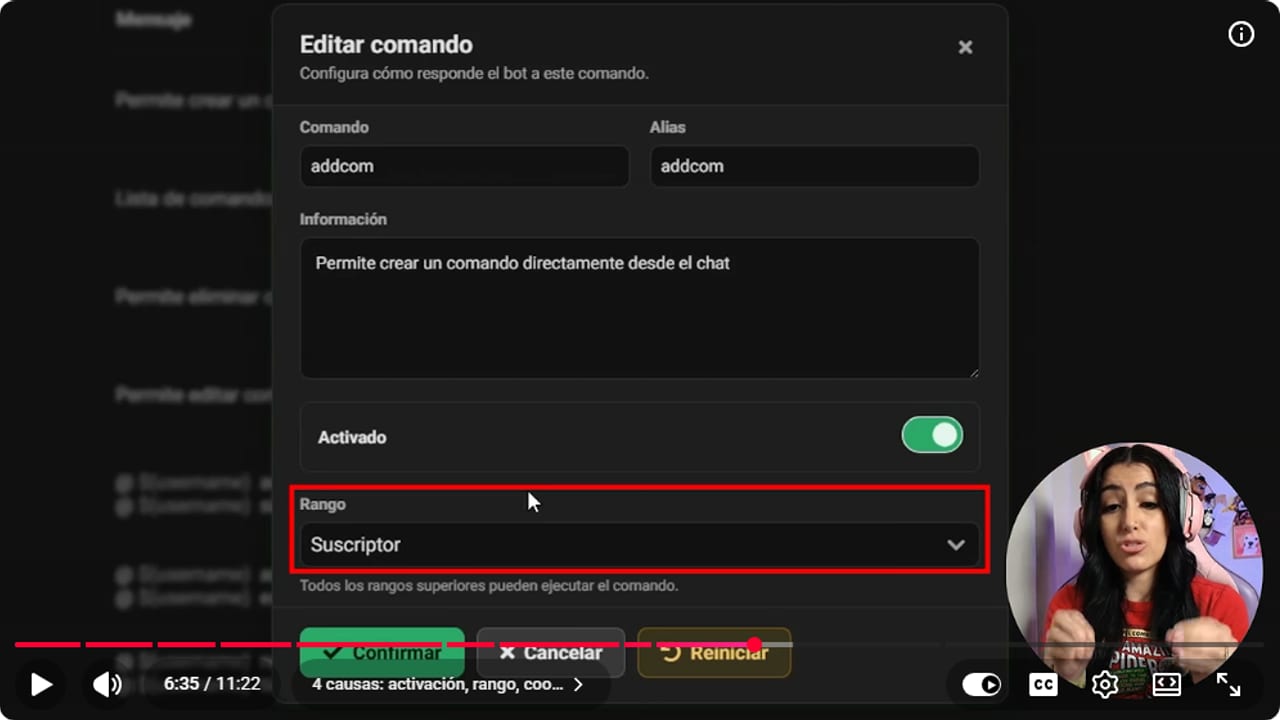
With rank set to Subscriber, only subs can use the command. For !discord, set it to everyone. YouTube · 6:36 ↗ - 10
Look for commands with the same name
Nicole Rojas | YouTube | 7:30 ↗The last cause is two commands sharing a name. Maybe you made !uptime without noticing BotRix already had one, or created !discord twice. Compare Mis Comandos with Predeterminados and rename or delete the extra.
What you should see: Each command name shows up only once across Mis Comandos and Predeterminados.
- 11
Problem 5, timers never post: lower the Lines setting
Nicole Rojas | YouTube | 9:01 ↗Four hours live and not a single follow-me-on-Instagram. Go to Chat Bot, Temporizadores (Timers) and open the timer with the pencil. Look at Líneas (Lines): it's the minimum number of chat messages that have to arrive before the timer posts. If it says 10 and your chat is quiet, it never fires, even with a 30 minute interval and three hours on air. Lines beat time. Drop it to 5. Don't set it to 0, or chat fills with spam.
What you should see: The Editar temporizador window shows 5 under Líneas, and the timer shows up in chat during your next stream.
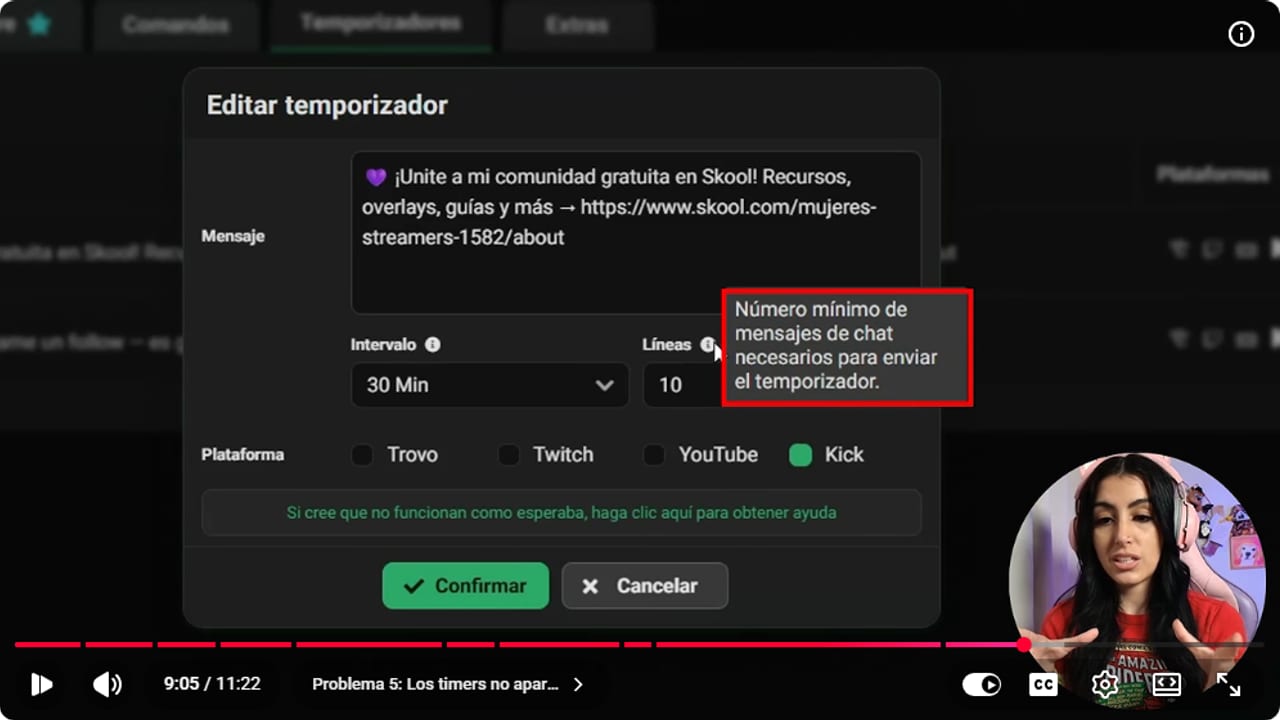
Lines is the minimum number of chat messages before the timer posts. At 10 in a quiet chat, it never fires. YouTube · 9:06 ↗ - 12
Check the timer's platforms, live status and interval
Nicole Rojas | YouTube | 9:45 ↗In the same window, make sure Kick is ticked under Plataforma, plus any other platform you stream to. If you started on Kick and later added YouTube or Twitch, the timer doesn't carry over by itself. Timers only run while you're live, so you can't test them offline. And keep the interval realistic: 60 minutes is a lot. I like 20 to 30 minutes, for example one every 20, one every 25 and one every 30. And that's it, BotRix is back on the job.
What you should see: While you're live, each timer posts in the chat of every ticked platform roughly every 20 to 30 minutes.
If something does not work
- You did everything and BotRix still ignores every command
- If you just connected or reconnected it, give it about an hour, because BotRix sometimes needs that long to sync with your channel. If it's been longer, sign out, sign back in with Kick and send /mod BotRix again, as in steps 4 and 5.
- It worked perfectly and overnight nothing works
- The token between BotRix and Kick expired. It's the usual suspect after a password change or a Kick update. Sign out and back in, and repeat that every two or three months so it doesn't die mid-stream.
- YouTube chat isn't reaching BotRix
- YouTube plays by its own rules, as usual. The stream has to be Public, the chat set to Live chat rather than Top chat, and BotRix needs to be a moderator in YouTube Studio. The first connection takes 5 to 10 minutes. The BotRix multichat guide for OBS walks through it step by step.
- Alerts don't show up in OBS
- Alerts come from the alerts widget, which has its own fix. Double-click the Browser source, click Refresh cache of current page and test again from BotRix. The full setup is in the Kick alerts with BotRix guide.
- A command works once and then vanishes
- That's the cooldown. Open the command with the pencil and make sure it doesn't say 60 minutes where you meant 10 seconds. During the cooldown BotRix won't send it again, however many times people type it.
Test before you go live
- You sent !discord, or whichever command you use, from another account and BotRix replied within seconds.
- No two commands share a name across Mis Comandos and Predeterminados.
- Your public commands have rank set to everyone and a cooldown in seconds, not minutes.
- Every timer has all your streaming platforms ticked and a 20 to 30 minute interval.
- There's a reminder on your calendar to sign out of BotRix and back in within two or three months.
- And that's it: BotRix answers in your Kick chat again, no delay, no leaving you on read.
5 Problemas de Botrix en Kick y Cómo Solucionarlos en 1 Minuto | 2026
Watch the full tutorial (in Spanish) ↗Common questions
Why isn't BotRix working on Kick when I already set it up?
The usual causes are a chatbot that's off or set to another platform, BotRix missing the moderator role, the sync hour right after connecting, and an expired token. Check them in that order. Most take under a minute to fix.
How often should I sign out and back in to BotRix?
Every two or three months, or whenever you remember. That gives BotRix a fresh token so it doesn't drop out mid-stream. Do it before you go live, not during.
How many lines should a timer need?
For a quiet chat, 5 is a good start. At 10 it may never post, and at 0 it turns into spam. Adjust as your chat gets busier.
Can I test timers without going live?
No. BotRix timers only run while your stream is live. Test them during a short stream or at the start of your next one.
Do I need to pay for BotRix to make it work properly?
No. Everything in this guide is fixed with the free version. BotRix has a paid plan with faster replies and better stability for very busy chats, for when your streaming career takes off and the bot can't keep up.


