

Short answer
Before you start
- A Kick account with access to your channel chat
- A free BotRix account (you sign in straight with Kick)
- Links to your socials, Discord or community for commands
- A short list of words you don't want in your chat
- OBS, if you want your chat on screen
Bring your setup to a 24/7 AI Streamer Coach
Ask Streamer Coach →Get personalized feedback to fix streaming issues and plan your next content.
Step by step
- 01
Sign in to BotRix with Kick
Nicole Rojas | YouTube | 1:31 ↗Want a bot that moderates chat, answers commands and plugs your socials while you play? If you use Nightbot on Twitch, BotRix is the same idea for Kick. Open the BotRix website, pick Kick as the platform and sign in. You can now log in with Kick directly, no Google or Discord detour. On the permissions screen, leave every box ticked, since BotRix needs to read and change your chat, then click Allow access. If you run more than one channel, check that you're signed in as the one you want to use.
What you should see: The BotRix dashboard opens with Kick selected under Platform at the top.
- 02
Make BotRix a moderator on your channel
Nicole Rojas | YouTube | 2:33 ↗This is the step that matters most. Without the moderator role, commands, timers and moderation all fail. You used to be able to find Botrix in Kick's moderator list and pick the verified account, but in the video it no longer showed up that way for me. Kick's help still documents the dashboard route (Community, Moderators (in some versions of the dashboard it's under Roles), Add New) and also the /mod command followed by a username. What worked for me was chat. In BotRix, under Chatbot, there's a notice with the /mod botrix command. Copy it, go to your stream chat, paste it and press Enter.
What you should see: Your stream chat shows a notice saying Botrix has been added as a moderator.
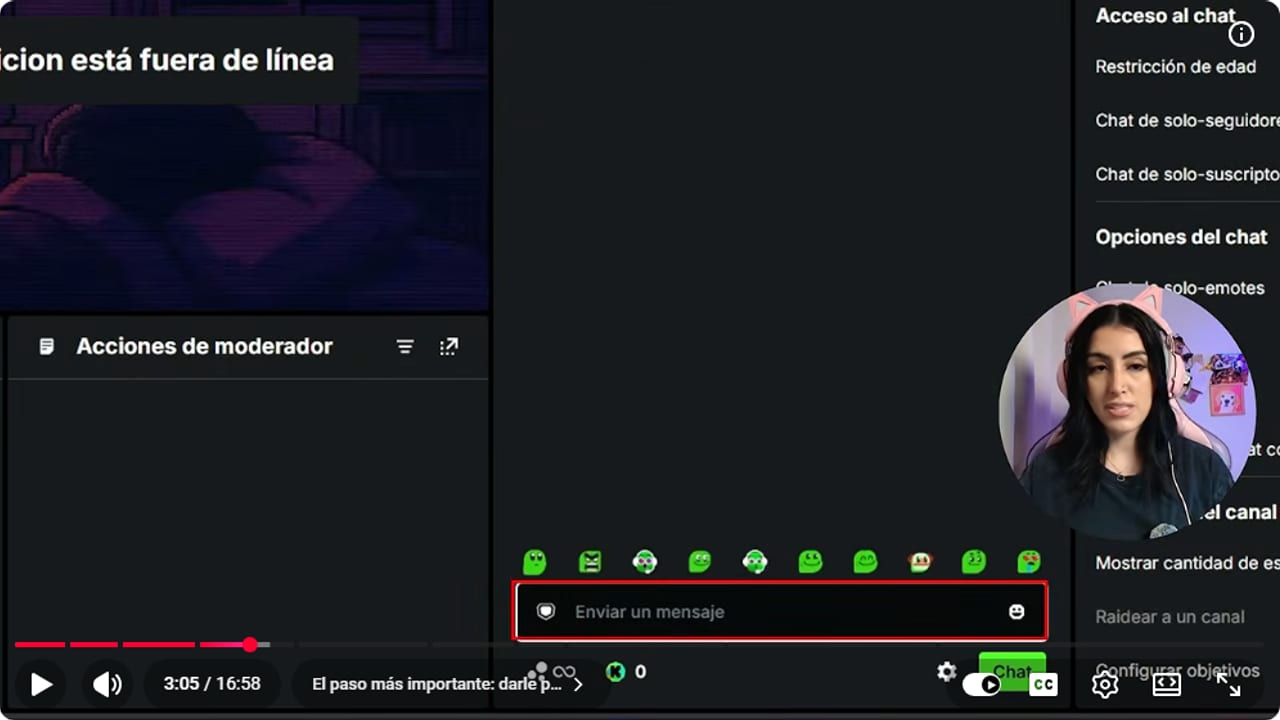
This is where you paste /mod botrix. It's the only way left to make it a moderator. YouTube · 3:06 ↗ - 03
Switch the chatbot on with Kick selected
Nicole Rojas | YouTube | 3:34 ↗Back in BotRix, check again that the top says Kick. If you use several platforms and another one is selected, nothing will work. Under Chatbot, flip the switch on. A box pops up asking you to make sure the bot is a moderator. You just did that, so click Confirm.
What you should see: You see the Moderation, Name, Commands, Timers and Extra tabs.
- 04
Block the words you don't want in chat
Nicole Rojas | YouTube | 11:24 ↗On to Moderation, which keeps insults, spam and the classic buy followers pitch out of your chat. Pure horror. Start with the most important one, offensive words protection. Click Configure and type the words you don't want to see. Don't feel like listing them one by one? Ask ChatGPT, Claude, Gemini or whichever AI you use something like: I'm a streamer, what offensive words might show up in my chat? I want to paste them into BotRix to block them. Paste the list in, add a custom message if you want, choose which roles can skip the filter and click Confirm.
What you should see: Your words are listed in the offensive words protection and that protection shows as switched on.
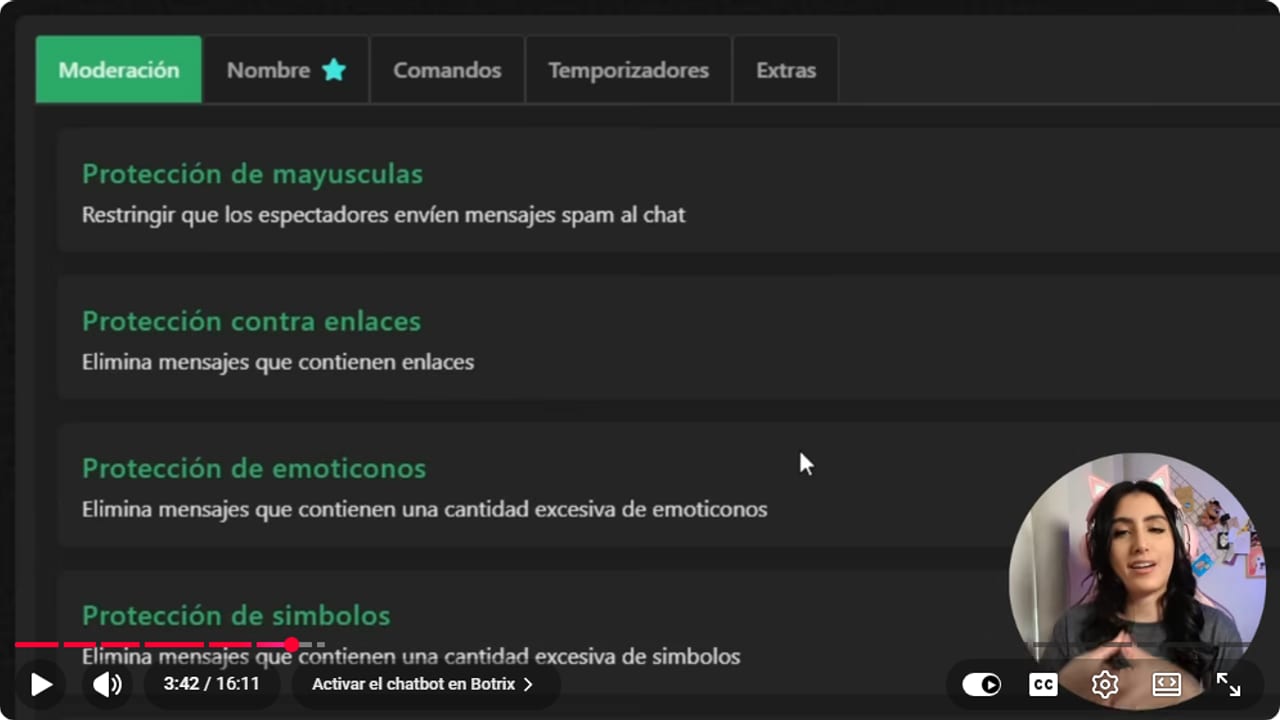
Each category is checked separately before it is enabled. YouTube · 3:43 ↗ - 05
Choose what else to filter: links, symbols, emotes and caps
Nicole Rojas | YouTube | 9:50 ↗Link protection is a must, because it wipes out the usual buy viewers messages. Careful, though: it can also delete a link to a clip someone made on your stream. So under Configure, choose the bypass roles, like moderator, OG, VIP or subscriber, who are allowed to post links. That's also where you set the timeout and a custom message, something like don't post links, we don't know you.
The rest depends on your community. Caps protection removes people yelling in all caps (I keep it off, because sometimes people just get excited). Emote protection and symbol protection remove messages with too many emotes, stickers or symbols. I leave both off because my community doesn't abuse them, but see what works for yours.
What you should see: Moderation shows the protections you picked switched on, and link protection lists the roles that can post links.
- 06
Create your first command, like !discord or !instagram
Nicole Rojas | YouTube | 4:05 ↗A command is a word your viewers type so the bot replies on its own. Go to Commands, My commands, and click Add. Commands always start with an exclamation mark: !discord. Under Access, choose when it works: always, live only or offline only. I leave it on always. In the message, write something like Join my Discord and paste your link. Command only is a premium option, so skip it.
Under Platform, tick every platform you use. If you multistream, one command covers them all, with no rebuilding it per platform like in Nightbot. Cooldown gives you 3, 5 or 10 seconds (I use 10, my chat isn't that fast) and Cooldown mode sets whether it counts per user or globally. Price uses channel points, so leave it alone, and set Rank to Everyone. Click Confirm.
What you should see: The command shows under My commands with its reply, the ticked platforms and the cooldown.
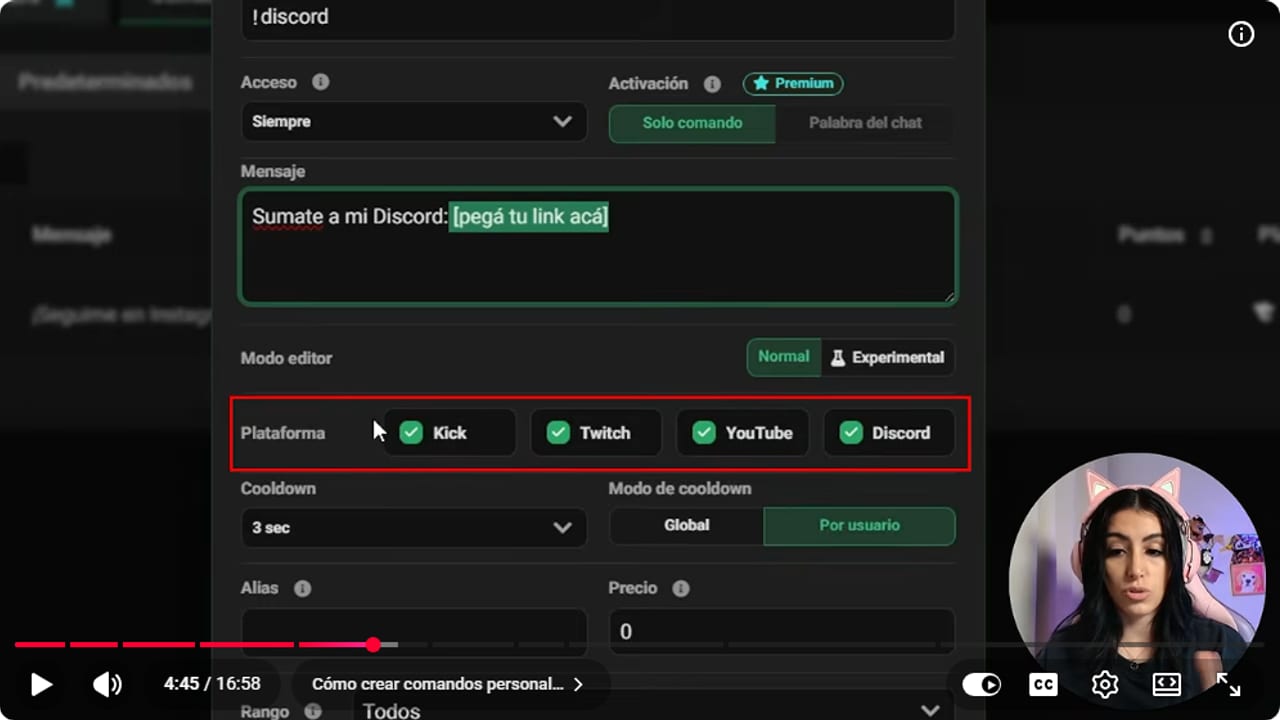
The new form: access, message, platforms and a 3, 5 or 10 second cooldown, per user or global. YouTube · 4:46 ↗ - 07
Test the command and add the defaults
Nicole Rojas | YouTube | 5:16 ↗Go to your stream chat and type !discord. If BotRix replies, both the chatbot and the command work. Then check Defaults, where you'll find ready-made commands to approve and tweak: !commands lists everything that's active, another one edits commands from chat (moderators only), and !uptime tells newcomers how long you've been live. Add your own too: Instagram, YouTube, TikTok, one socials command with a single link for everything, and !setup with your camera, lights and mic, so you stop answering the same question every stream.
What you should see: BotRix answers in chat with your message and your Discord link.
- 08
Add a timer with a minimum line count
Nicole Rojas | YouTube | 7:17 ↗Timers post a message to chat every so often, so you're not pasting your socials by hand all night. Go to Timers and click Add. Write the message, for example: If you're enjoying the stream, drop a follow, it's free and helps me a lot. Under Interval, set how often it goes out. I use 20 minutes so it doesn't get excessive.
Under Lines, put 10. That's the minimum number of chat messages needed before it posts, so even after 20 minutes it stays quiet until 10 messages have come in. When you're starting out with a small chat, that saves you from a chat with your reminder 500 times and two actual questions. Keep Kick ticked and click Confirm. More ideas: your socials for clips every 25 minutes and your community or Discord every 30. Three or four timers is plenty to start.
What you should see: The new timer appears at the bottom of the list with Kick switched on, 20 minutes and the 10 message requirement.
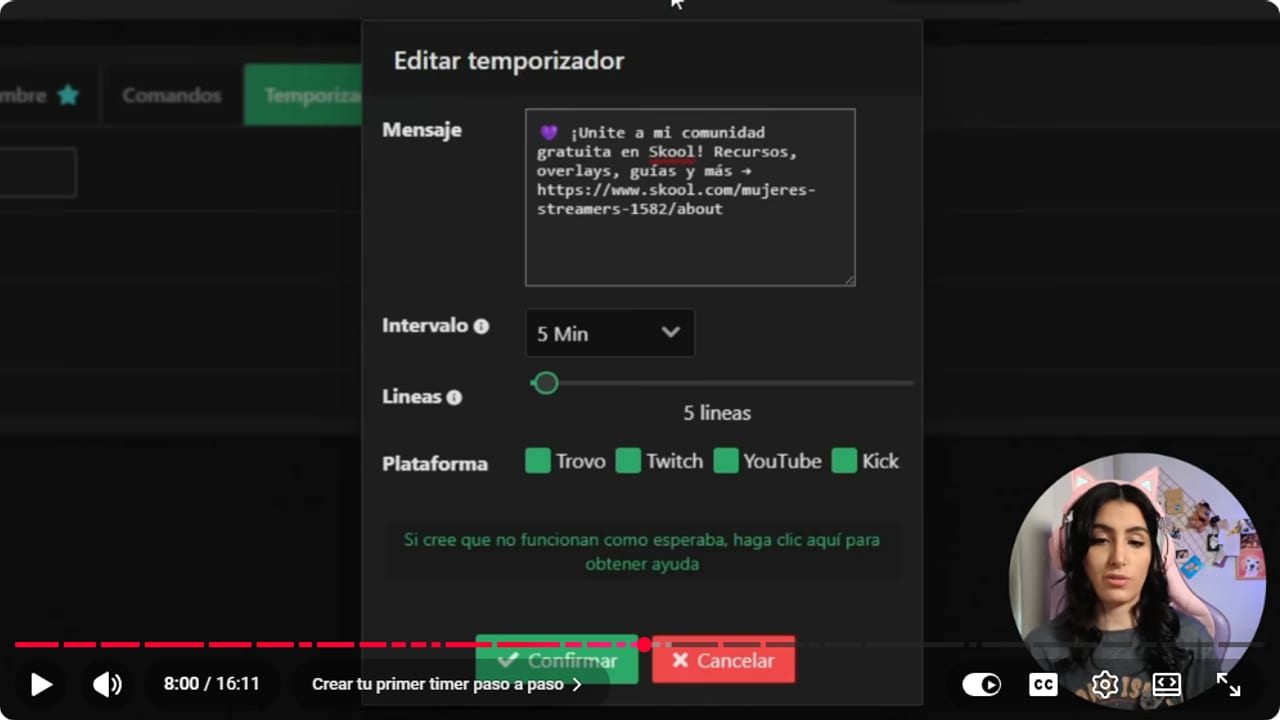
The minimum line count keeps the message out of a quiet chat. YouTube · 8:01 ↗ - 09
Decide whether you want chat alerts
Nicole Rojas | YouTube | 10:07 ↗Under Extras there's Chat alerts. Every follow, Kick, sub, gifted sub or raid gets written in chat, in case you missed the sound and want to say thanks. Some streamers find it spammy. If you're just starting, it helps you get to know the people who show up. Try it, and turn it off if it bugs you.
What you should see: When someone follows, BotRix posts the notice in chat with that person's name.
- 10
Optional: levels and points for your community
Nicole Rojas | YouTube | 12:08 ↗The level system rewards people who take part in chat. Turn it on and check Loyalty, Ranking to see who sits where. You can add a panel to your channel's About section showing the top spots, with a prize like playing a match with you or picking the next game. Points are earned by watching and spent in Loyalty, Store. Only use them if you'll actually keep up, since it's one more thing to watch while you stream, and Kick already has its own points.
What you should see: Loyalty, Ranking lists your chatters with each person's level or points.
- 11
Set up the BotRix chat overlay
Nicole Rojas | YouTube | 12:22 ↗BotRix also has a widget that puts your chat on screen. Go to Widgets, scroll to Chat overlay and go through the options: animation, transparent design, font, font size, shadow and whether messages run bottom to top or top to bottom. I'd hide bot messages and commands so your timers don't get mixed in with real people, and turn on the new message sound if you have few viewers and get absorbed in the game.
I'd leave the platform icon off, because YouTube, Twitch and Kick don't like seeing other platforms' logos on their screen. You can skip the message time too, it's just extra clutter. When you're done, click Copy.
What you should see: BotRix confirms the link was copied and tells you to paste it into your streaming software.
- 12
Add the chat to OBS as a browser source
Nicole Rojas | YouTube | 14:00 ↗In OBS, pick the scene you want it in, like your game scene. Under Sources, click plus, choose Browser and name it something like Kick Chat. Paste the link into URL and don't share it with anyone. Set Width to 400 and Height to 600. If you turned on the message sound, tick Control audio via OBS. Leave the rest as is. Click OK and place it wherever you like. Mine goes under my camera, so my face and the comments sit together.
To use it in other scenes, like Starting soon, click plus, Browser, Add existing, and pick Kick Chat. Shrinking it in OBS shrinks the text too, so change the size from BotRix instead.
What you should see: Kick Chat shows in the Sources list of your scenes, and when someone types, their message appears on screen.
- 13
Test everything with your stream open
Nicole Rojas | YouTube | 14:10 ↗Open your Creator Dashboard, go to your stream and try each command in chat. Type one of the words you blocked to check that BotRix deletes it. While you're live, keep an eye out for your timers going off on schedule. If BotRix doesn't respond, make sure it's a moderator on your channel (with /mod botrix), that the chatbot is switched on, meaning it shows green at the top rather than grey, and that the selected platform is Kick, not Twitch or YouTube.
What you should see: Your commands reply, the blocked word vanishes from chat and the timer posts once both the time and line count are met.
If something does not work
- You can't find Botrix when you search your moderators
- In the video, the verified Botrix account no longer showed up in that search for me. Copy /mod botrix from the notice under Chatbot in BotRix, paste it into your stream chat and press Enter. Once chat says it was added as a moderator, you're sorted. If you prefer the dashboard, Kick's help puts it under Community, Moderators (in some versions of the dashboard it's under Roles), Add New.
- BotRix doesn't say anything in chat
- Check three things. BotRix is a moderator (send /mod botrix in your chat if you're not sure), the chatbot switch is green rather than grey, and the platform at the top of BotRix is Kick, not Twitch or YouTube.
- You type the command and nothing happens
- Type it exactly as you created it, exclamation mark included. If you just used it, wait for the cooldown to run out. Also check that Kick is ticked for the command and that Access isn't set to offline only while you're live.
- BotRix deletes clip links
- That's link protection treating everyone the same. Open Configure on that protection and tick bypass roles like moderator, OG, VIP or subscriber. Your trusted people can share clips and spam still stays out.
- Your chat looks like a billboard
- You have too many timers or they fire too often. Keep three or four, space them 20 to 30 minutes apart and raise the line minimum to 10. Nobody wants to land on a stream with 300 million automated reminders, which is what happens to me with Nightbot.
- The BotRix chat doesn't show in OBS
- The source looks empty until someone types, which is normal, so send a test message in your chat. If it's still blank, go back to Widgets, Chat overlay, copy the link again and paste it into the browser source URL.
- You've tried everything and it still won't work
- Check the guide on the most common BotRix problems on Kick, which covers the cases that come up most. If yours isn't there, BotRix has a Discord server. Search it for your issue, since someone has very likely asked already.
Test before you go live
- The top of BotRix says Kick, so your changes land on the right channel.
- At least three commands work, such as !discord, !uptime and !commands.
- A normal message with a few caps or an emote stays put.
- A clip link posted by a moderator or VIP stays in chat.
- Your on-screen chat looks the same in every scene, with no platform icon.
- And that's it: a free chatbot that moderates and answers for you while you play.
Cómo configurar el chatbot de Kick con Botrix
Watch the full tutorial (in Spanish) ↗Common questions
What is BotRix, and is it free?
BotRix is a free tool for content creators, with alerts and a chatbot that moderates your chat. It works with Kick, Twitch, YouTube, Trovo and Discord. The features in this guide are free. There is an optional paid premium plan that adds things like Command only. In the video I said I think the price depends on your country, and in another one I mentioned roughly 2 to 3 dollars, so check the current price on the BotRix site.
Why does BotRix need to be a moderator?
Without that role it can't delete messages, answer commands or post timers in your chat. In the video I give it the role by typing /mod botrix in my stream chat, and Kick confirms it with a notice.
How many timers should I have?
Three or four, every 20 to 30 minutes. For example, a follow reminder every 20, your Instagram and TikTok for clips every 25 (mine get good ones, because I'm always yelling on stream) and your community or Discord every 30.
Can viewers send voice messages?
Yes. The option lives under Extras, Voice messages, which sends you to the widgets section. There you set the language, the command that triggers it and which role can use it. Some advanced options are paid.
What does a timer's minimum line count do?
It's how many messages have to show up in chat before the timer posts. When chat is quiet, the reminder waits, so newcomers see people talking instead of a list of your socials.
Should the OBS chat show platform icons?
Better not. I'd leave it off, because YouTube, Twitch and Kick don't like seeing other platforms' logos on their screen. That's my advice. This guide didn't find a rule about it in the platforms' help pages. What does exist is a Twitch condition: its Terms of Service (section 11) don't allow third-party services that combine chat from other platforms on your Twitch stream during a simulcast. Message timestamps don't add much either, unless your streams run really long.


