OBSFREE TOOLS
How to set up your stream with 5 free tools: Casterlabs, Aitum, BetterTTV, NCS and VDO.Ninja
The 5 free tools Nicole uses on every stream: one merged chat, multistreaming, emotes without Affiliate, copyright-free music and your phone as a webcam.

Short answer
Before you start
- OBS Studio, installed and up to date
- A Windows PC if you want Casterlabs
- A browser such as Chrome for BetterTTV and VDO.Ninja
- Your Twitch, YouTube, Kick or TikTok accounts, only the ones you stream on
- Optional: a phone with a decent camera to use as your webcam
Bring your setup to a 24/7 AI Streamer Coach
Ask Streamer Coach →Get personalized feedback to fix streaming issues and plan your next content.
Step by step
- 01
Merge every chat with Casterlabs
Nicole Rojas | YouTube | 0:50 ↗You're multistreaming with a pile of chats open and each one is asking something different. Not great. Casterlabs, through its Caffeinated app, pulls Twitch, YouTube, Kick and even TikTok chat into one place. Download it from casterlabs.co, open it and go to Widgets & Alerts to build your chat. In the platforms section, connect every platform you stream on, then bring that chat into OBS. As of 9 October 2026, the official site still offers it free and for Windows only. The full setup, with a reading dock and an on-screen chat, is in How to merge all your chats in OBS with Casterlabs (Nicole's video is in Spanish, with timestamps for each step).
What you should see: Casterlabs shows the Widgets & Alerts screen with your chat widgets and their three-dot menus.
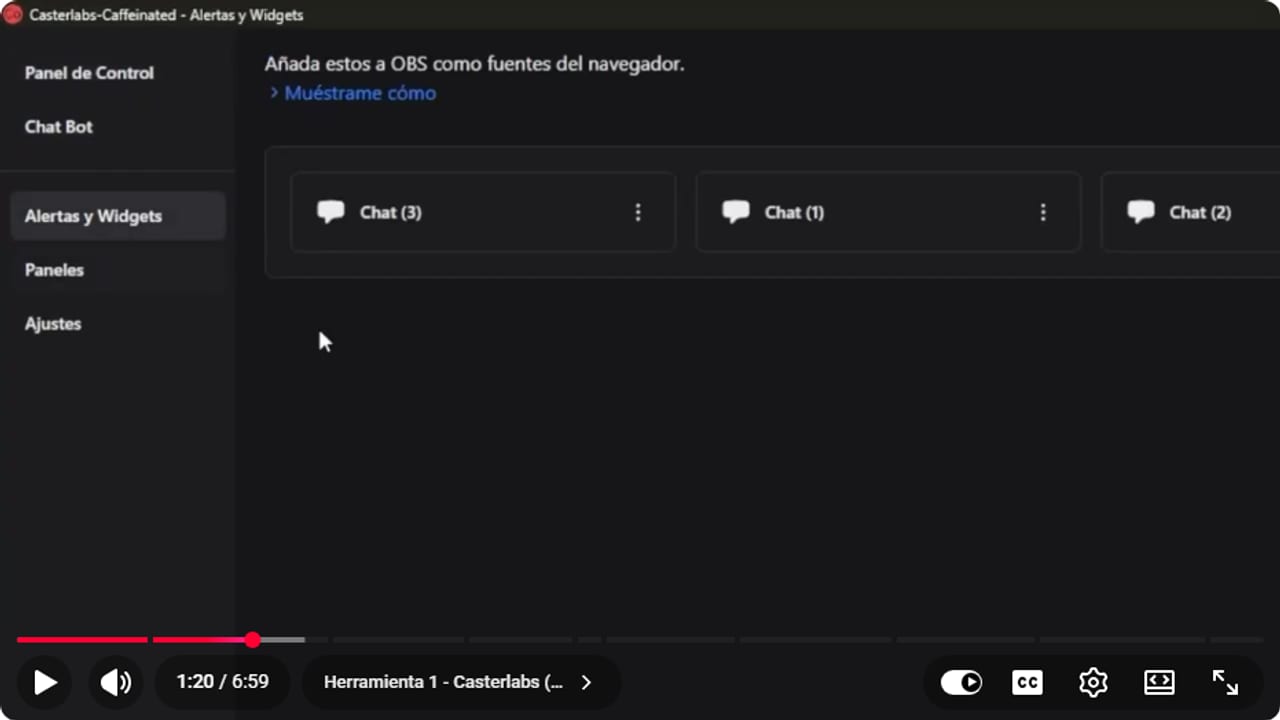
Widgets and Alerts is where you build the chat that goes into OBS as a browser source. YouTube · 1:21 ↗ - 02
Go live on several platforms with Aitum Multistream
Nicole Rojas | YouTube | 1:48 ↗Aitum Multistream is an OBS plugin that lets you go live on several platforms at the same time. Head to aitum.tv, click Free Download under Multistream and always install it with OBS closed. When you reopen OBS, you'll have a dock with your main canvas (Twitch, say), extra outputs such as YouTube or Kick, and the vertical canvas for TikTok or Reels. Click the green button and you're live everywhere. Nicole flags two things: YouTube needs the stream scheduled first, and going live everywhere at once depends on your internet keeping up. The vertical canvas comes from the Aitum Vertical plugin, which Aitum now bundles free with Multistream in its Stream Suite. Full walkthroughs: How to multistream from OBS for free, and How to stream vertically to TikTok and Instagram from OBS.
What you should see: OBS shows the Aitum dock with your main canvas, a YouTube output and the vertical canvas, each output with its own green button.
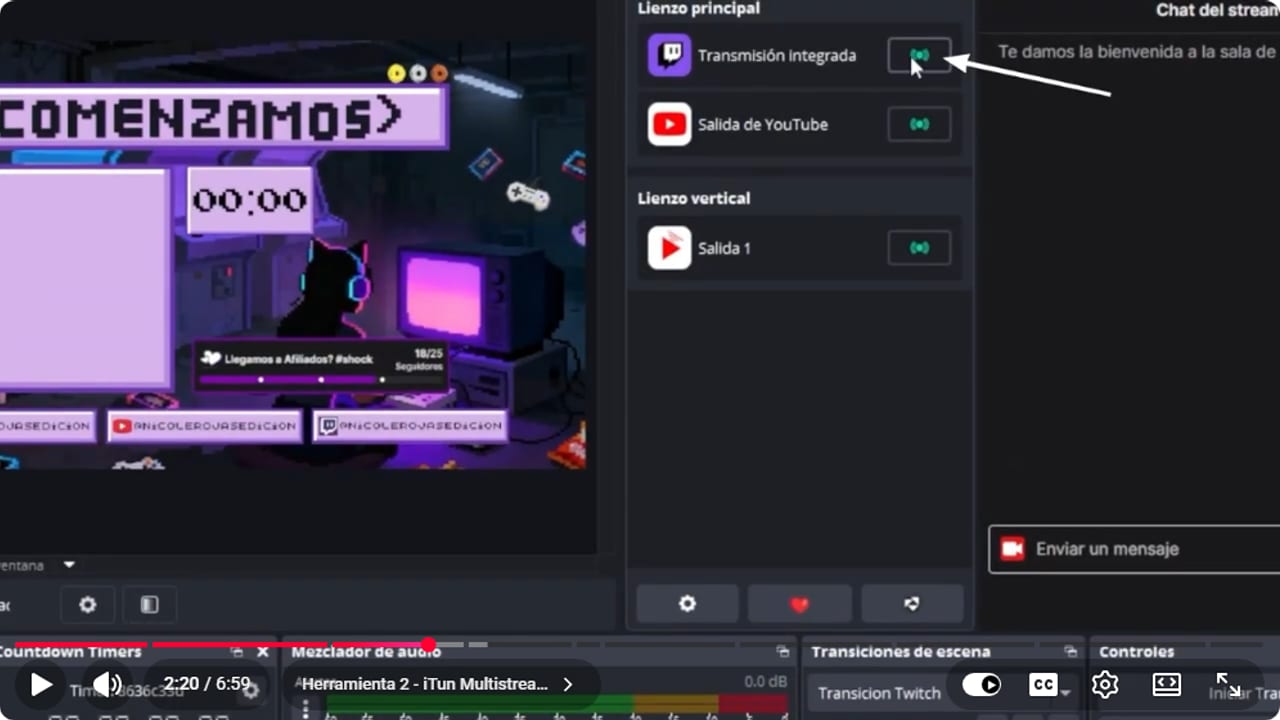
Each output gets its own green button. The main canvas sits on top, the vertical one for TikTok or Reels below. YouTube · 2:21 ↗ - 03
Get emotes before Affiliate with BetterTTV
Nicole Rojas | YouTube | 3:20 ↗BetterTTV is a browser extension that lets you make your own emotes without being an Affiliate. Go to betterttv.com and install it in your browser (Nicole uses Chrome). Then open your channel and click the gear under your chat, where the BetterTTV options now show up. An icon appears beside the chat with the emotes you've made, plus plenty from other channels. One update since the video: the extension is still free, but BetterTTV now sells an optional Pro plan with room for more emotes. To make the emotes themselves, see How to make animated Twitch emotes without Affiliate. If you can already upload native Twitch emotes, the rules are in How to make Twitch emotes: sizes, requirements and upload.
What you should see: A BetterTTV icon appears next to your chat, and clicking it opens the emote list.
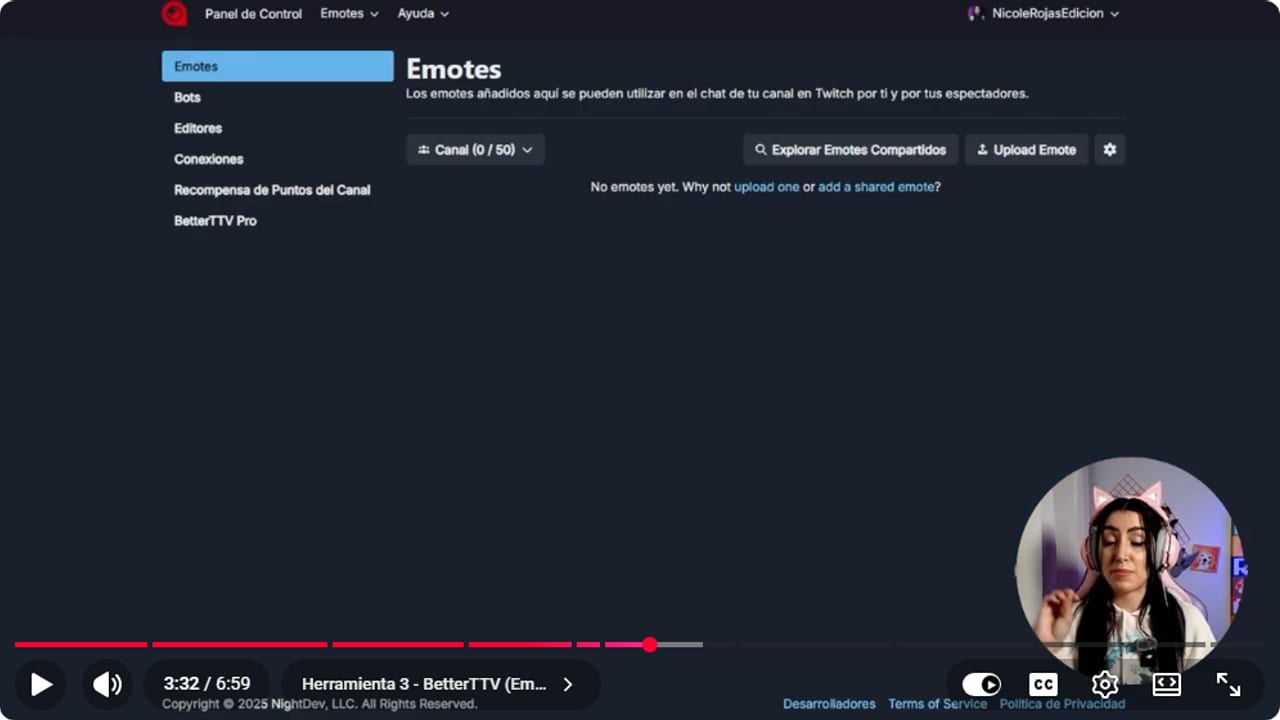
The BetterTTV dashboard is where Upload Emote lives. Note that BetterTTV Pro already shows in the menu. YouTube · 3:33 ↗ - 04
Add copyright-free music from NCS
Nicole Rojas | YouTube | 4:05 ↗Copyrighted music on stream puts your VOD at risk of getting muted. NCS (NoCopyrightSounds) has a big library you can play on your streams. Go to ncs.io, pick a song and grab it with Download Track. The deal is that you credit it: every track comes with a block of text to paste into your description, with the song name and a link. Nicole picks a few songs, plays them in Windows Media Player and gives music its own channel in OBS, separate from her voice. As of 9 October 2026, NCS's usage policy still says it's free for creators. If you also want that music out of your Twitch VOD, see How to split OBS audio tracks for a copyright-free VOD and recording.
What you should see: The song page shows a Download Track button and a box with the credit text for your description.
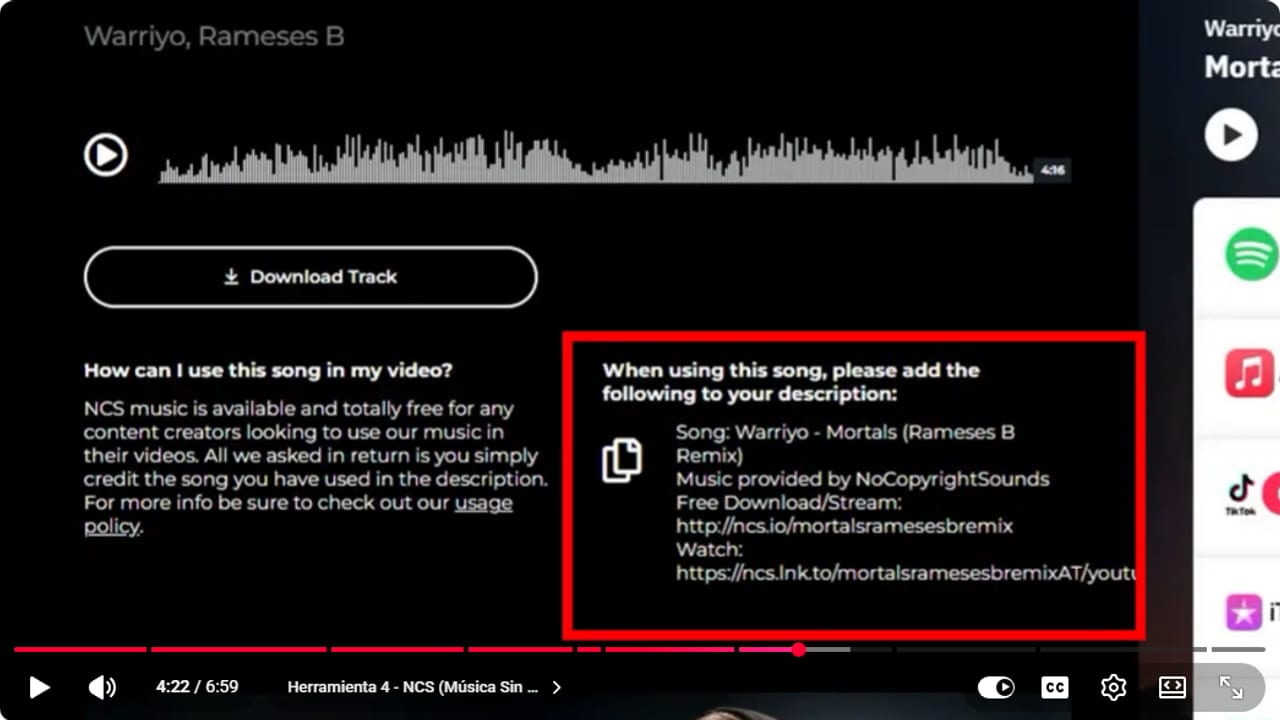
Every NCS track comes with its credit text ready. Copy it into your stream description. YouTube · 4:23 ↗ - 05
Use your phone as a webcam with VDO.Ninja
Nicole Rojas | YouTube | 4:56 ↗Good webcams are expensive and, as Nicole puts it, maybe not worth it. VDO.Ninja sends your phone's camera to OBS through the browser, with no app to download: all you need is the link. Go to vdo.ninja, click Create a Room, add your camera and then add that camera to OBS. As of 9 October 2026, the site still says it's free, with no downloads and no sign-in. It's the tool that surprised people most on Nicole's channel, and the full setup is in How to use your phone as a webcam in OBS. And that's it: one chat, multistreaming, emotes, music and a camera, without spending a cent.
What you should see: vdo.ninja shows the Create a Room and Add your Camera to OBS buttons, and once you allow the camera your phone's picture appears.
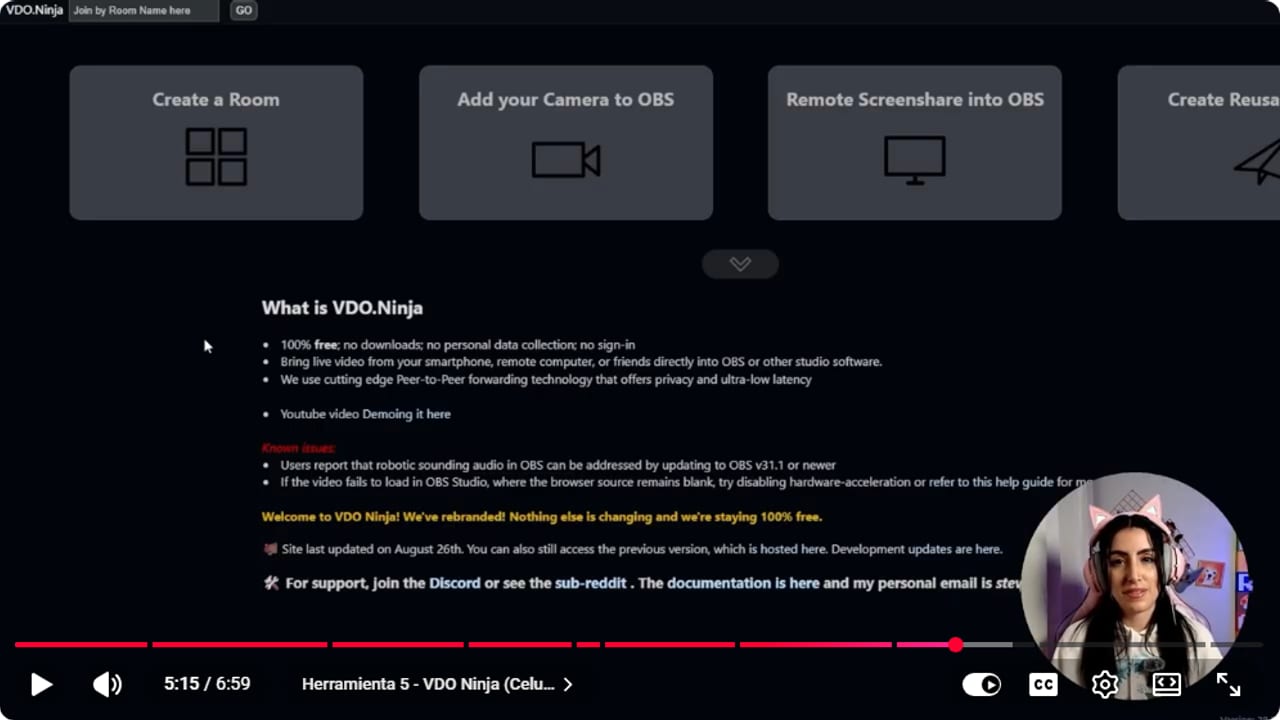
It all happens in the browser, with no downloads and no account. Pick an option and go from there. YouTube · 5:16 ↗
If something does not work
- The Casterlabs chat shows up blank in OBS
- Close OBS and make sure both OBS and Casterlabs are on their latest versions. Then open Casterlabs first and OBS second so it can connect. Open them the other way round and the chat often comes up blank.
- I installed Aitum Multistream and it's not in OBS
- Nicole always installs it with OBS closed. Quit OBS completely, run the installer again and reopen it. Still missing? Update OBS, since Aitum's site asks for a recent version.
- YouTube won't start when I hit the green button
- According to Nicole, YouTube needs the stream scheduled first. Schedule it in YouTube Studio, and if you've never done that, it's covered in How to livestream on YouTube from scratch with OBS.
- My VOD got muted because of the music
- Copyrighted music and Twitch don't get along. Switch to NCS tracks, paste the credit into your description and send music to its own OBS channel so you can keep it out of the VOD.
Test before you go live
- Casterlabs opened before OBS, and test messages from each platform show up in your chat.
- You tested the multistream privately before going live everywhere.
- Your YouTube stream is scheduled if you're adding it in Aitum.
- Each NCS track's credit is pasted into your description.
- Music sits on its own channel in the OBS mixer.
- Your phone is charging and the VDO.Ninja picture runs smoothly in OBS.
5 herramientas gratis que Nicole usa en todos sus streams
Watch the full tutorial (in Spanish) ↗Common questions
Are these tools actually free?
Nicole is blunt about it: free, no trial, no credit card. We checked the official sites on 9 October 2026, and Casterlabs, Aitum Multistream, NCS for creators and VDO.Ninja are still free. BetterTTV is too, though it now has an optional paid Pro plan.
Does Casterlabs work on a Mac?
No, the official site only offers a Windows download. On a Mac, see the BotRix multichat option in the guide How to put Twitch, Kick and YouTube multichat in OBS with BotRix.
Do I have to credit NCS music on a livestream?
Yes. NCS asks you to credit the artist and song in the description of your video or livestream. The easy way is to copy the credit block that comes with each track and paste it as is.
Does VDO.Ninja need an app on my phone?
No. It runs in the browser, with no download and no account. Open vdo.ninja on your phone, allow the camera and use the link in OBS.
Do I need all five?
Not at all. Start with whichever one fixes today's problem: drowning in chats, get Casterlabs, and if your webcam looks like it came off an old Nokia, try VDO.Ninja. Add the rest when you need them.


