
Short answer
Before you start
- A Twitch account with access to the Creator Dashboard
- Your phone and email handy for two-factor authentication
- Your tax and payment details ready for when the Affiliate invite arrives
Bring your setup to a 24/7 AI Streamer Coach
Ask Streamer Coach →Get personalized feedback to fix streaming issues and plan your next content.
Step by step
- 01
Check the current requirements in Achievements
Twitch Affiliate Program FAQ, reviewed October 9, 2026 ↗Open the Creator Dashboard and go to Achievements. Right now Twitch asks for 25 followers, 4 hours streamed, 4 different days, and an average of 3 viewers across 4 stream days in the last 30 days. It used to be 50 followers and a lot more hours, so if an old tutorial shows different numbers, don't panic.
What you should see: Achievements shows four progress bars, one for each Affiliate requirement.
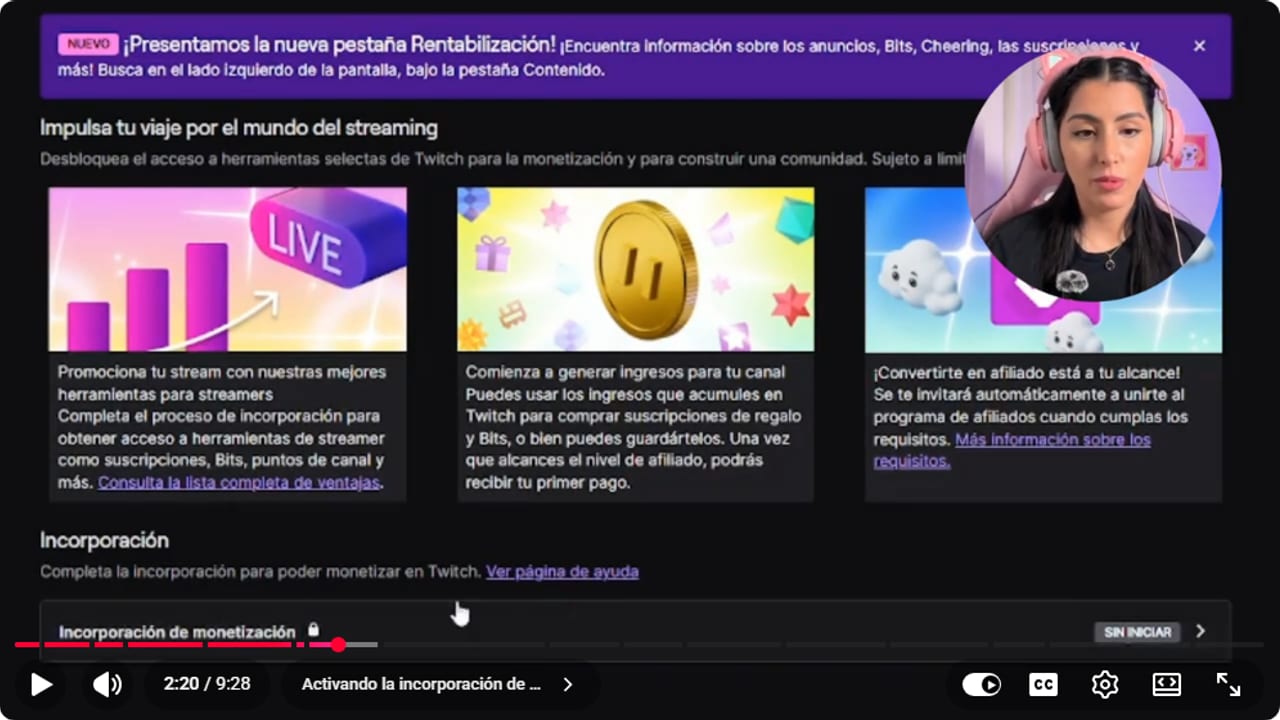
This dashboard comes from the tutorial and may show older requirements. The guide uses official requirements reviewed September 6, 2026. YouTube · 2:21 ↗ - 02
Know the catch: tools yes, payouts no
Twitch Help: About Monetization on Twitch, reviewed October 9, 2026 ↗In the video Nicole says Twitch opened Bits and subscriptions to anyone from day one, first in the US and then in Latin America. Today Twitch's help center says the monetization tools are available globally, and that if you can't see onboarding in your region you should contact Support. You can receive Bits and subscriptions without being an Affiliate, but Twitch doesn't pay anyone who isn't an Affiliate or Partner, even past $50. Nicole describes it as a virtual wallet you can spend inside Twitch. Twitch calls it Spendable Balance, it's optional and you have to enroll to use it.
What you should see: In the Creator Dashboard, Monetization lets you open the monetization onboarding setup.
- 03
Finish monetization onboarding
Nicole Rojas · YouTube · 2:32 ↗In Monetization, scroll down to Monetization Onboarding, which says Not started, and click Start. Twitch asks you to turn on two-factor authentication with your phone and email. Then you fill in your details and sign the monetized streamer agreement. That switches on Bits, subscriptions and your custom emotes.
What you should see: Monetization Onboarding no longer says Not started and shows as complete.
- 04
See what you get now and what waits for Affiliate
Nicole Rojas · YouTube · 3:02 ↗Twitch shows a table of tools by status: onboarded, Affiliate or Partner. In the tutorial, the onboarded account had subscriptions, Bits, subscriber emotes and badges, founder badges, Channel Points, predictions, polls and raids. Ads, charity and subscriber-only streams came later, and custom Cheermotes are for Partners only. Read the table in your own account, because Twitch changes these lists.
What you should see: The table in your dashboard groups tools by status and marks the ones already active for you.
- 05
Use analytics to pick what to try
Nicole Rojas · YouTube · 5:35 ↗In the Creator Dashboard, open Analytics, Overview, and scroll to Suggested Categories. Filter by genre and language to see average viewers per channel and how many channels are on each game. For more data, SullyGnome shows trending games over the last 7 or 3 days and the fastest-growing channels. Treat it as ideas, not orders: if you don't enjoy a game, your chat won't either.
What you should see: Suggested Categories lists each game with its average viewers per channel in your language.
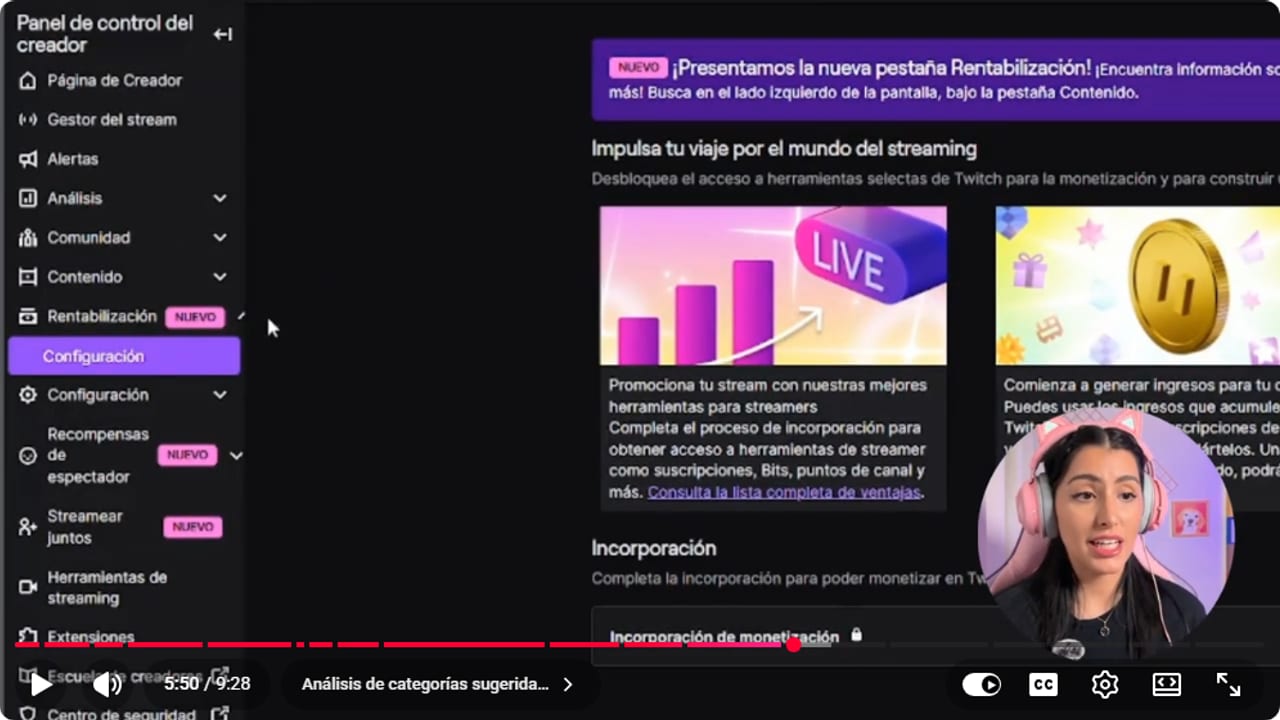
Category analytics helps compare times and games without promising an outcome. YouTube · 5:51 ↗ 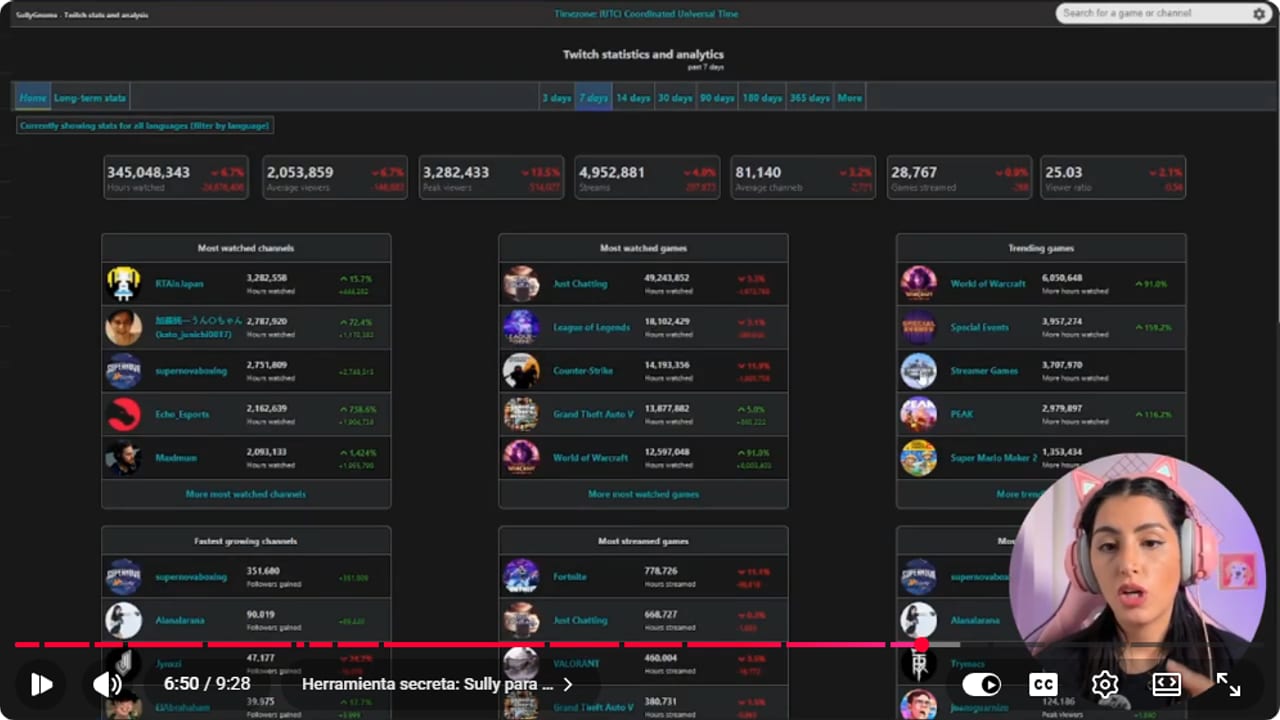
Channel analytics shows which sessions to compare with achievement progress. YouTube · 6:51 ↗ - 06
Take your clips to other platforms
Nicole Rojas · YouTube · 7:37 ↗Nicole says growing only inside Twitch is really, really hard, because people may not be used to browsing the home page for something to watch. These days people look for connection and community. That's why she calls clips one of the most important tools for building visibility: someone may see you in an Instagram reel, feel inspired and show up to one of your streams. In the video she links another tutorial on clips and reels with an OBS plugin.
What you should see: Your clip is live on Instagram or TikTok with your Twitch channel name in the caption.
- 07
Accept the invite and treat it as a starting line
Nicole Rojas · YouTube · 8:37 ↗According to Twitch's Affiliate FAQ, once you meet the last requirement you get an invitation by email and in your Creator Dashboard, normally within 24 to 48 hours. Accept it, add your tax and payment details and turn on two-factor authentication. Nicole closes with this: reaching Affiliate doesn't mean your stream is a success, it means you hit the minimum to monetize. If you stream for fun, great. If you want to make a living from it, this is where the real work starts.
What you should see: Achievements shows all four requirements complete and the Affiliate invitation lands in your inbox.
If something does not work
- Monetization doesn't show Monetization Onboarding
- Twitch says the monetization tools are available globally, but if onboarding doesn't show up in your region you need to contact Support. Sign out, sign back in and check Monetization again. If it's still missing, contact Twitch Support.
- You have a wallet balance but can't withdraw it
- Annoying, but that's how it works: Twitch doesn't pay anyone who isn't an Affiliate or Partner, even past $50. Check Achievements to see what you're still missing. Meanwhile, if you enrolled in Spendable Balance, you can use that balance inside Twitch for Bits and subscriptions.
- Achievements doesn't update after a stream
- Twitch says progress can take time to update. Wait for it to refresh before running an extra stream just to add hours.
- You met every requirement and no invite arrived
- Check the email tied to your account, including spam, and look for a notice in the Creator Dashboard. Twitch says the invite normally arrives within 24 to 48 hours of meeting your last requirement, and sometimes takes a few days. If several days pass with nothing, contact Support.
Test before you go live
- You know how far you are from each of the four requirements.
- Two-factor authentication is on for your account.
- You signed the monetized streamer agreement.
- You've written down which tools you use today and which come with Affiliate.
- At least one clip from your last stream is posted outside Twitch.
Cómo ser afiliado en Twitch y qué cambió en la monetización
Watch the full tutorial (in Spanish) ↗Common questions
What are the current Twitch Affiliate requirements?
Twitch asks for 25 followers, 4 hours streamed, 4 different stream days and an average of 3 viewers across 4 stream days in the last 30 days. Check the official Affiliate FAQ before you plan around it, because the rules change.
Can I earn Bits and subs before I'm an Affiliate?
Yes, you can receive them once monetization onboarding is complete, but Twitch only pays Affiliates and Partners. Meanwhile you can enroll in Spendable Balance, which is optional, and use it inside Twitch for Bits, gift subs and recurring subs. Data as of October 9, 2026.
Can I have subscriber emotes without Affiliate status?
Yes. With onboarding complete you can already use subscriber emotes, subscriber badges and founder badges. Check the table in your dashboard for what's active, since it depends on your account status.
Does becoming an Affiliate guarantee growth?
No. Affiliate means you reached the minimum to monetize, not that your stream is a success. Clips, your format and your community still do the heavy lifting.
How do I choose a game that helps me grow?
Look at Suggested Categories in Analytics and, for more data, SullyGnome. Use them for ideas, not as rules. Playing a game you hate for viewers is a plan with an expiry date.


