

Short answer
Before you start
- A monetized Twitch channel, such as an Affiliate account
- A name for your points and a square icon made in Canva
- A moderator to help with the queue, if you can
- A Blerp account (its sound library is free to browse) and OBS, only if you want sound rewards
Bring your setup to a 24/7 AI Streamer Coach
Ask Streamer Coach →Get personalized feedback to fix streaming issues and plan your next content.
Step by step
- 01
Turn on Channel Points
Twitch Channel Points Guide, reviewed October 9, 2026 ↗Channel Points are your channel's own currency: viewers earn them by watching and spend them on whatever you offer. Open Creator Dashboard, Viewer Rewards, Channel Points. In the video the item shows up as Power-ups and Channel Points, and Twitch's current guide calls it Channel Points. Twitch's guide says the feature is for monetized channels. If you only see Emotes and rewards, your tools haven't been switched on yet, so wait, usually less than 24 hours. The first thing you'll see is Enable Channel Points: leave it on.
What you should see: The page shows Enable Channel Points switched on, with the points display customization right below.
- 02
Name your points and pick an icon
Nicole Rojas · YouTube · 2:31 ↗Under the points display customization, click Edit. Start with the name: something in your channel's style, like terror coins if you play horror games. You can also ask chat what to call them. Then the icon: Twitch wants three square images at 28, 56 and 112 pixels. They show up tiny, so a simple coin or little ghost made in Canva works better than a detailed drawing. Upload them and click Save changes.
What you should see: The points bubble shows your new name and icon instead of the default one.
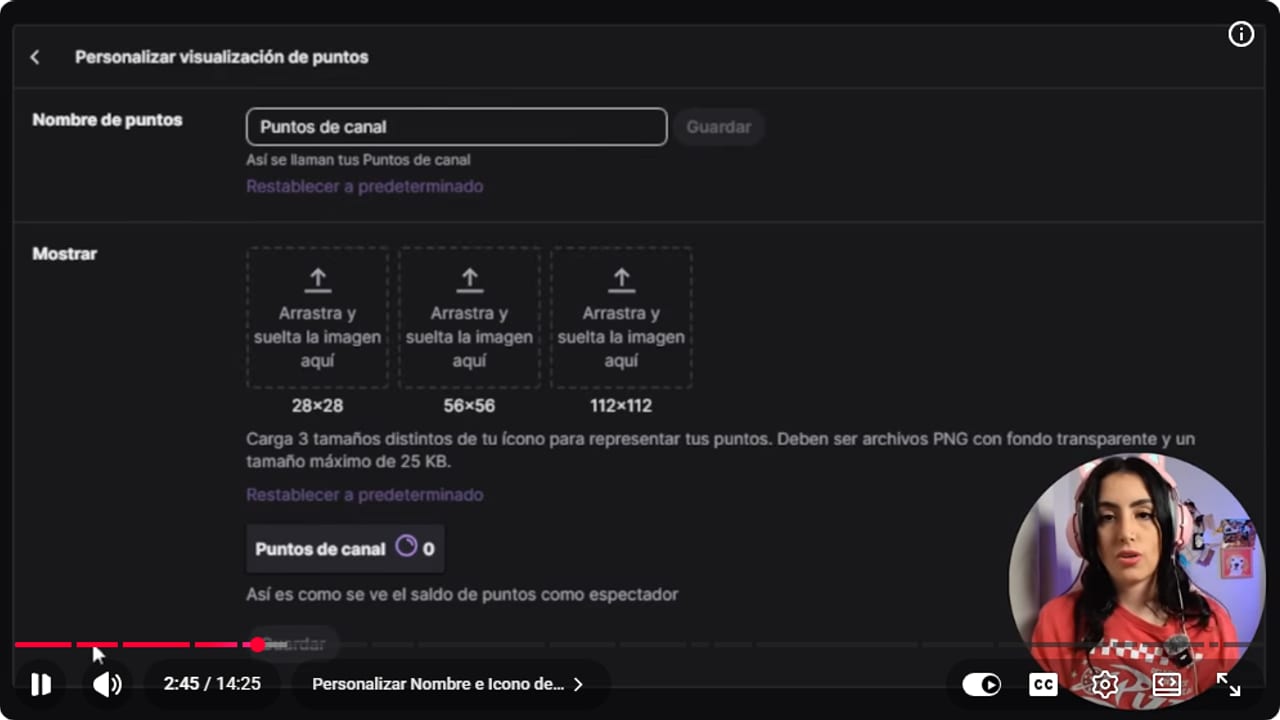
Customization sets the name and icons viewers will see in chat. YouTube · 2:45 ↗ - 03
Review the default rewards
Nicole Rojas · YouTube · 7:04 ↗Click Manage and scroll to the default rewards: highlight my message, a random sub emote, send a message in sub-only mode, choose a sub emote and modify a single emote. Edit lets you change the cost. There's also a recommended costs switch (Twitch's help calls it Smart Costs), which lets Twitch adjust prices based on how much chat uses each one, and you can turn it on or off. I'd keep the defaults on: they get chat interacting and, if you're shy, they hand you reasons to talk.
What you should see: Each default reward shows its cost and the recommended costs switch.
- 04
Create your first custom reward
Nicole Rojas · YouTube · 8:35 ↗Further down, click to create a custom reward. Give it a name, say Play a match with me, and a description of what happens, like drop your gamer tag below. Turn on the option that requires the viewer to enter text, so they leave their username for you to add in the game. In this video Nicole sets 3000 to 5000 for the match and something easy like hydration at 50 to 100. In her second video (0:32) she gives the rule: the more effort it takes from you, the pricier it is, and she suggests 200 to 500 for a dance. Don't ask for personal details, because whatever they type shows up in chat.
What you should see: The preview shows the reward with its name, cost and a text box for the viewer.
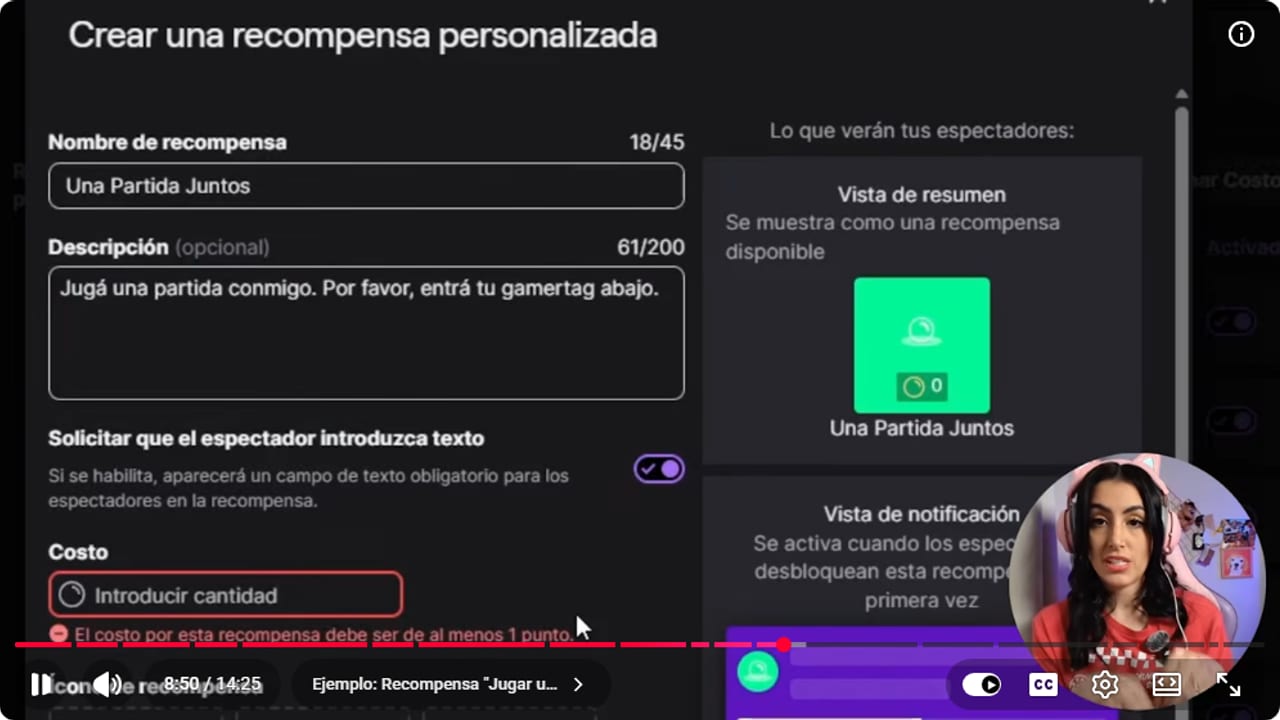
The reward sets its name, description, cost, and the information a viewer must send. YouTube · 8:50 ↗ - 05
Choose the queue, cooldown and limits
Nicole Rojas · YouTube · 9:37 ↗The skip reward requests queue option decides how a redemption works. On, it redeems instantly. Off, each request lands in a queue and you choose when to fulfill it, which is ideal for a match you can't play right that second. Nicole words it backwards once in the video, so confirm it in your Twitch dashboard. Under cooldowns and limits, set minutes, hours or days between redemptions, a per-stream limit and a per-user limit. For the match, one day of cooldown and one per stream. For hydration, 5 minutes, so you're not sipping water every half second. Click Create.
What you should see: The cooldowns and limits section shows the saved values for that reward.
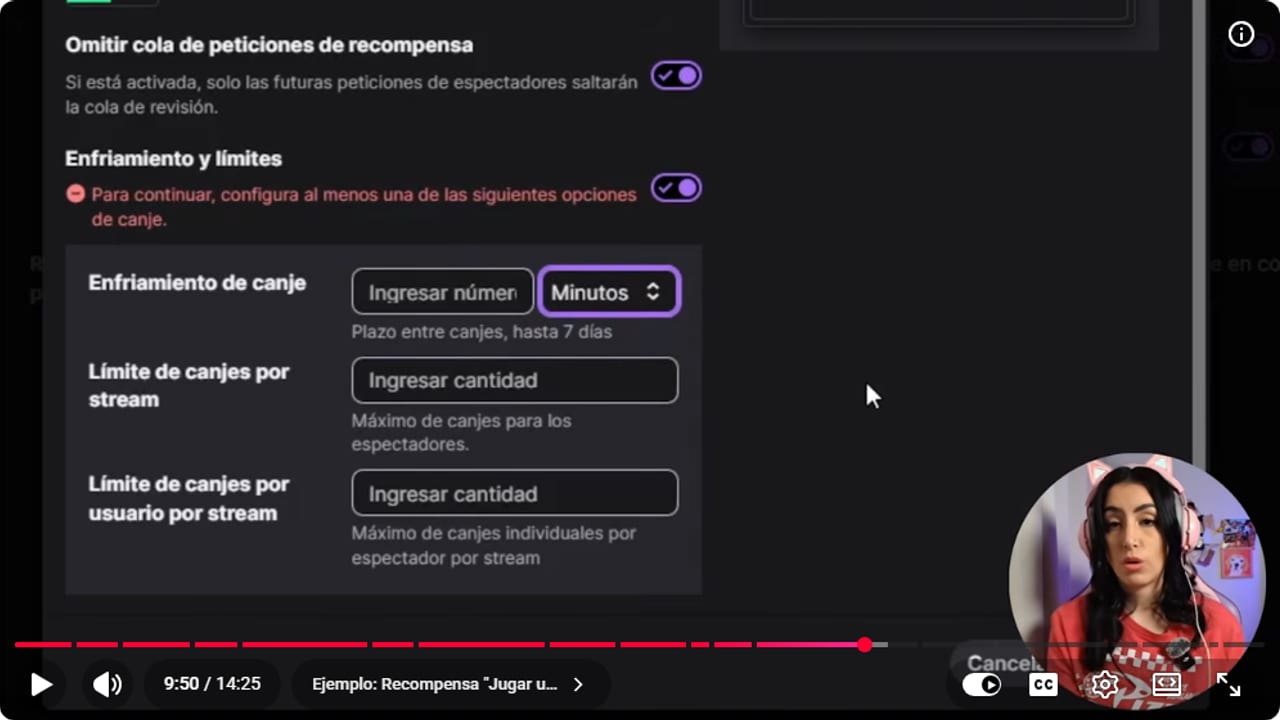
Per-stream, per-user, and cooldown limits control how many requests arrive at once. YouTube · 9:51 ↗ - 06
Set up a community challenge
Nicole Rojas · YouTube · 4:33 ↗Community challenges let chat pool points toward one big reward, like a long stream. Click create a challenge, add a name and the points goal. With 10 or 20 viewers, 10,000 to 20,000 points is reasonable, and you adjust from there. Pick the duration in days, the icon and the background color. Put a cap on everything, or you'll be streaming for 25,000 years. Heads up: once it's created, you can't edit it.
What you should see: When a viewer opens Channel Points, they see the challenge tab with its progress bar.
- 07
Add sound rewards with Blerp
Nicole Rojas · YouTube · 6:08 ↗Picture yourself deep in a horror game when someone in chat fires a scream that sends you flying out of your chair. That's Blerp. In the video Nicole says it's free. Today Blerp's page says the sound library is free to browse, but it lists channel point reward slots under its paid plan and doesn't say how many the free plan includes. Check its pricing page before you build this step. Go to Blerp, connect your Twitch account and browse the sound library: screams, jumpscares, horror sounds or your community's memes. In Blerp's Twitch Channel Points section you get a URL. In OBS, add a Browser source, call it alerts, paste the URL and tick the option to control audio via OBS. Back in Blerp, click Next and confirm you heard the test sound. Then create a new reward with the sound, set its cost, cooldown and redemptions per person, and save.
What you should see: The sound reward you built in Blerp shows up in Twitch's Viewer Rewards with its cost.
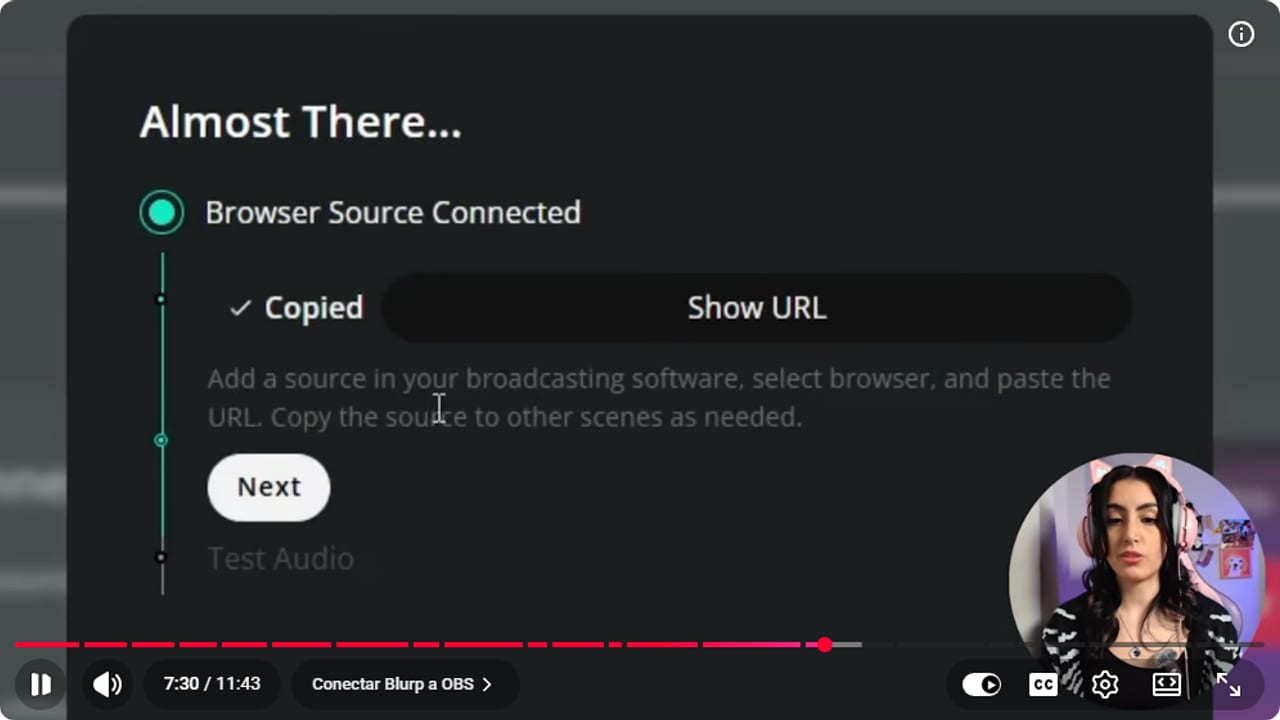
An external integration should confirm its connection before you test a sound reward. YouTube · 7:30 ↗ - 08
Work the queue with your moderator
Nicole Rojas · YouTube · 10:39 ↗For rewards that go through the queue, open Viewer Rewards, Channel Points, Manage, and under your custom rewards open the requests review. You'll see who redeemed each one and can complete it or reject it, which refunds the points. Your mods can do the same: in Stream Manager, in the moderator view of chat, they search for requests and open the reward queue.
What you should see: The queue lists who redeemed each request, with options to complete or reject it.
- 09
Try predictions
Nicole Rojas · YouTube · 11:40 ↗Predictions are bets with points. In Phasmophobia, say, chat can guess the ghost. In Stream Manager, if Predictions isn't in your Quick Actions, click the plus and add it. Write the question, the two outcomes and the submission period, which is how long people have to vote. One minute at the start of a match, before any clues, works well. When it ends, you resolve it and the winners split the points from the people who lost. And that's it, Channel Points up and running in style.
What you should see: The prediction appears above chat with its two outcomes and a voting countdown.
If something does not work
- Channel Points is missing from the dashboard
- If you only see Emotes and rewards, Twitch hasn't switched on your monetized-channel tools yet. It usually takes less than 24 hours, though sometimes it's several days. Nicole says becoming an Affiliate took her longer than normal.
- Rewards pile up faster than you can handle them
- Raise the cooldown or lower the per-stream limit on the most popular ones. Ask your moderator to open the queue. Twitch's guide says redemptions can be paused from the queue, by mods too, while you catch up.
- You get weird or overly personal questions
- For a question reward, leave skip queue off so you can read questions before answering. If one isn't OK, reject it and say it's too personal. The points go back to the viewer automatically.
- The Blerp sound doesn't play on stream
- Check that Blerp's Browser source is in the scene you're using and has control audio via OBS ticked. Then look at the OBS audio mixer to make sure that source isn't muted.
- You need to change a challenge you already created
- It can't be edited. Cancel it, Twitch refunds chat's points, and create it again with the right values. Redoing things early on is normal, you're still testing.
Test before you go live
- Your points have a name that fits your channel.
- Every custom reward says what happens after it's redeemed.
- Rewards that take your time go through the queue instead of redeeming instantly.
- Your moderator knows how to open the queue from mod view.
- You tested a Blerp sound and heard it in OBS.
- You have five or six rewards, not fifty.
Cómo configurar los puntos del canal en Twitch
Watch the full tutorial (in Spanish) ↗Common questions
Who can use Channel Points on Twitch?
Twitch's current guide says they're available to monetized channels, such as Affiliates. If you're already an Affiliate and they're not showing, give it a little time, since activation can lag.
How many rewards should I create at first?
Five or six, so chat learns how to use the points. Load a ton at once and even you won't remember which ones are on. Ask chat which they like and delete the duds without guilt.
How much should rewards cost?
The more effort they take from you, the more they cost. A water break can be 50 to 100 points, a lurk check-in around 50, picking the map 500 to 1000, and a match together 3000 to 5000. As chat grows, you'll need to adjust.
Can I edit a community challenge after creating it?
No. You have to cancel it, and Twitch refunds the points to your community. Then create it again with the goal and duration you wanted.
Can a reward ask viewers for information?
Yes, with the option that requires the viewer to enter text, such as a gamer tag. Don't ask for personal details, because Twitch says those responses appear in chat.


