
Short answer
Before you start
- OBS Studio 32 or newer (Aitum Vertical requires it), with your horizontal scenes already working
- The free Aitum Vertical plugin from aitum.tv
- A TikTok or Instagram account
- Depending on the method: a Restream account (the free plan carries Restream branding), TikTok Live Studio or Aitum Multistream
- Optional: 9:16 overlays made in Canva
Bring your setup to a 24/7 AI Streamer Coach
Ask Streamer Coach →Get personalized feedback to fix streaming issues and plan your next content.
Step by step
- 01
Install Aitum Vertical
Nicole Rojas · YouTube · 1:02 ↗On Twitch, people have to go looking for you. TikTok shows your stream to people who've never heard of you, and you don't have to pick one: you can stream horizontal to Twitch and vertical to TikTok at the same time. Go to aitum.tv, scroll to Vertical and download it. Aitum's current page says Vertical is for OBS Studio 32 or newer. Install it with OBS closed. If OBS was open, close it and start it again.
What you should see: The OBS Docks menu now has new entries starting with Vertical.
- 02
Open the vertical docks and create your first scene
Nicole Rojas · YouTube · 1:32 ↗Under Docks you'll find Vertical Scenes, Vertical Sources, Vertical Transitions and Vertical. Your OBS now has two worlds living side by side, horizontal and vertical. First open Docks, Vertical, which is your 9:16 preview. Then open the vertical scenes dock, click + and add a scene called Chatting.
What you should see: A vertical canvas appears next to your horizontal preview, and Chatting is listed in the vertical scenes dock.
- 03
Add vertical sources and a Gameplay scene
Nicole Rojas · YouTube · 2:04 ↗In the vertical sources dock, click + and add Video Capture Device, which is your camera. Add the rest below it: Image for a static overlay, Media Source for an animated one, and Browser for chat. Then create a second vertical scene, Gameplay, with your camera again plus a Game Capture. Lay it all out for a phone screen.
What you should see: The vertical canvas shows your camera and overlays in 9:16, with the vertical sources and the mixer in view.
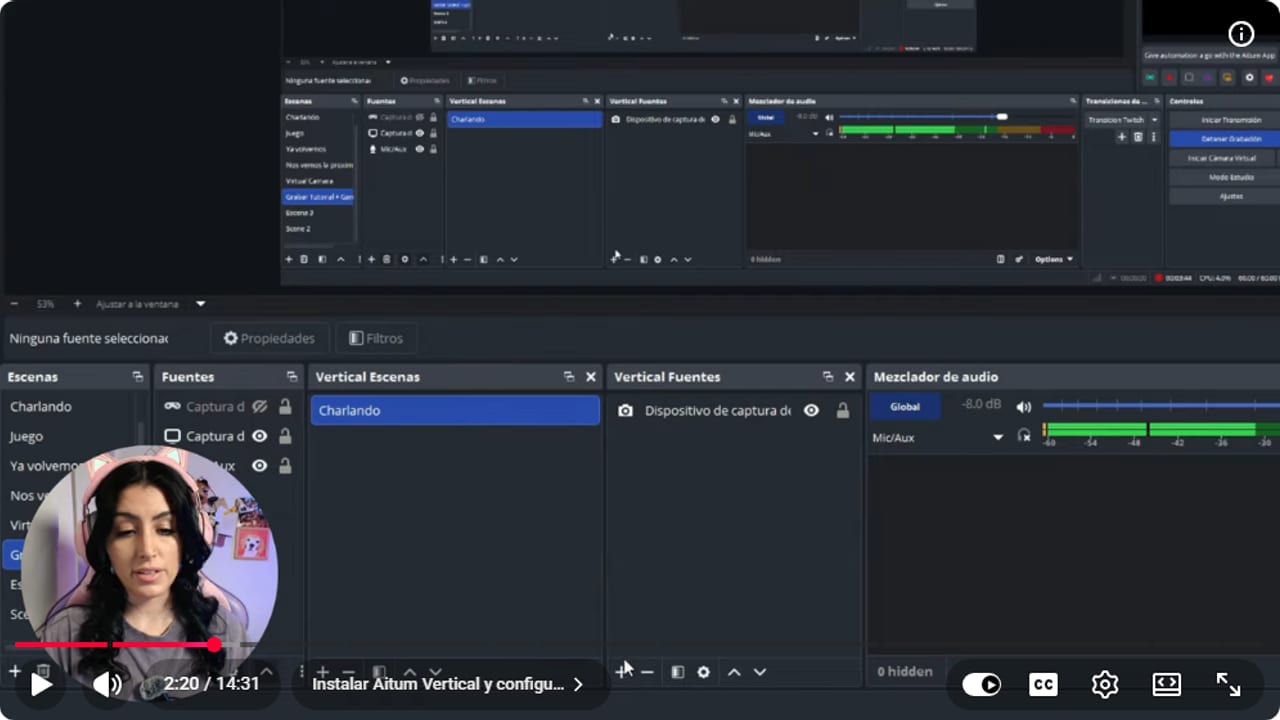
The vertical canvas keeps sources and the mixer visible while the mobile scene is built. YouTube · 2:21 ↗ - 04
Link each horizontal scene to its vertical twin
Nicole Rojas · YouTube · 3:05 ↗Linked scenes switch together, so you're not clicking two things every time. Right-click your horizontal Chatting scene, choose Linked Scenes and select the vertical Chatting. Do the same for Gameplay. A tip: to make vertical look like horizontal, recreate the same overlays in Canva at 9:16. The first attempt will look a bit odd, and that's fine. It gets better with every stream.
What you should see: Clicking a horizontal scene switches the vertical canvas to its linked scene automatically.
- 05
Option A: Restream with its vertical plugin
Nicole Rojas · YouTube · 4:06 ↗This is the easiest route, because there's no stream key involved. Heads up: Restream's free plan streams to 2 channels at once, say Twitch and TikTok, and carries Restream branding. Sign up for Restream, go to Channels and connect TikTok. If it says you can't go live yet, click Apply and Restream helps you request access using a link to another platform you stream on. For Instagram, click Add new and connect your account. What you see can vary by account, so if something doesn't show up, check Instagram's official help. In OBS, under Settings, Stream, pick Restream as the service and connect your account. Then download Restream's vertical plugin, install it with OBS closed and open Docks, Restream Vertical.
What you should see: The Restream Vertical dock shows your Chatting and Gameplay scenes, with connected channels like TikTok and Twitch underneath.
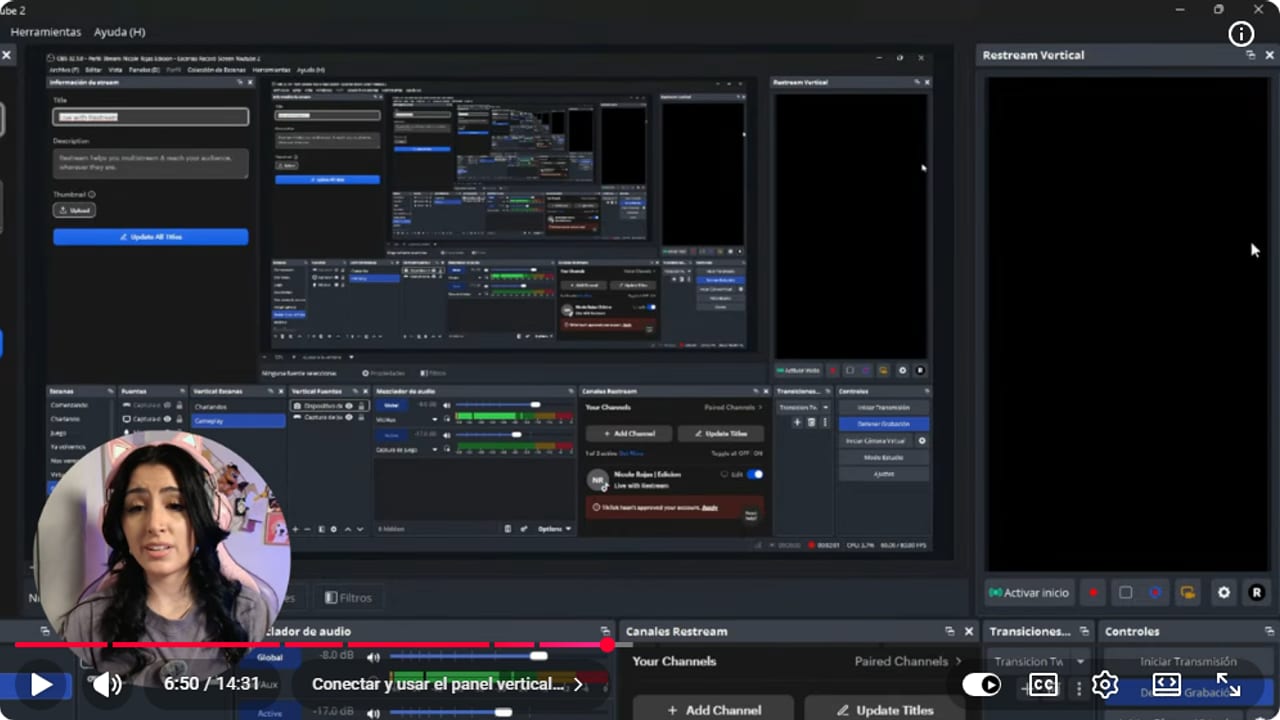
The Restream Vertical panel keeps the mobile scene and connected channels inside OBS. YouTube · 6:51 ↗ - 06
Option B: TikTok Live Studio with the virtual camera
Nicole Rojas · YouTube · 7:40 ↗Download TikTok Live Studio from its official page. The idea is simple: OBS builds the vertical signal with Aitum Vertical and sends it out as a virtual camera, and Live Studio picks it up like a webcam. In the video, Nicole builds a scene in OBS for that virtual camera (7:40 to 8:12). Confirm Live Studio shows the vertical layout and not the horizontal one. You need this because only one app can use a camera at a time. In OBS, click Start Virtual Camera. In Live Studio, click Go Live, create a Chatting scene, add a camera, choose the OBS virtual camera and set the resolution, FPS and format. Set up your mic and go live.
What you should see: Live Studio shows your vertical OBS layout as if it were a webcam.
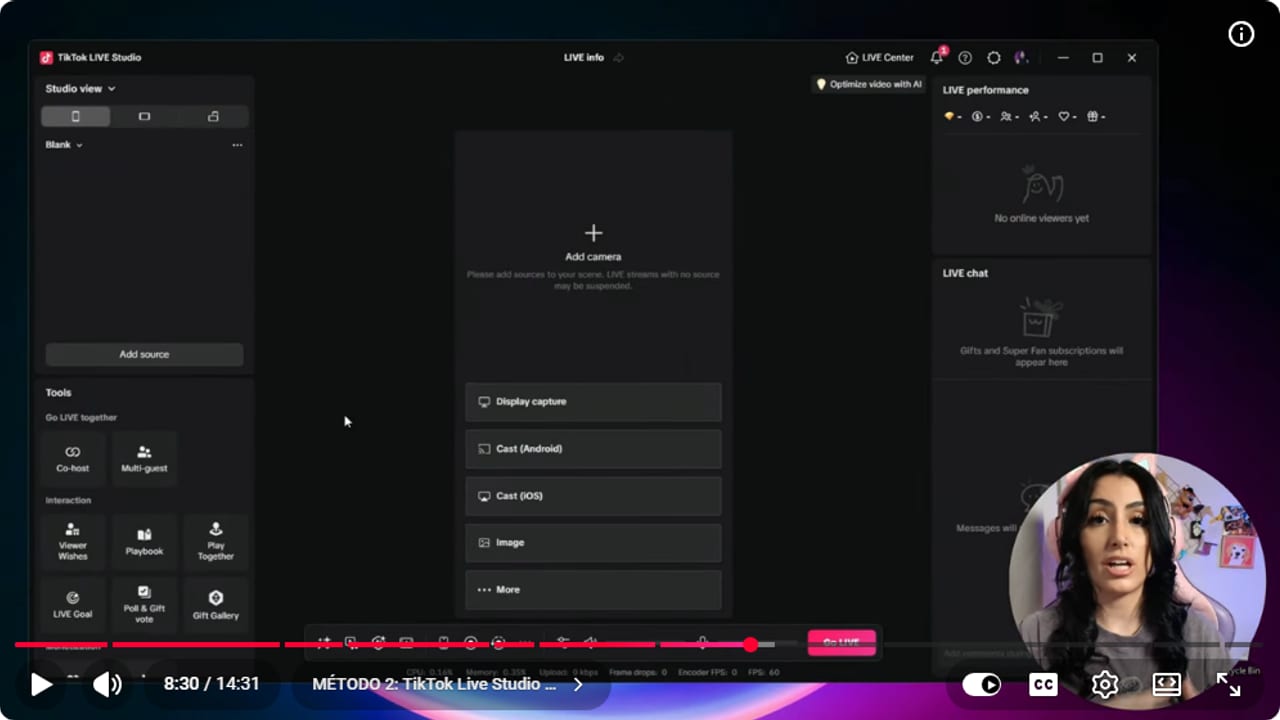
The virtual camera sends the vertical OBS composition to the streaming app. YouTube · 8:31 ↗ - 07
Option C: a TikTok stream key with Aitum Multistream
Nicole Rojas · YouTube · 10:16 ↗According to Nicole, not everyone gets a TikTok stream key: sometimes you need a certain number of followers, sometimes you have to apply, and TikTok isn't exactly clear about it. Requirements vary, so see our guide "How to go live on TikTok: requirements, followers and LIVE Studio". To check, open TikTok on your phone, tap Go Live and look for Cast to PC, or go to TikTok Live Producer and create a session. If a server URL and key appear, install Aitum Multistream with OBS closed. Aitum's current page says Vertical can already stream from the vertical canvas and offers Stream Suite with Vertical and Multi together, so check aitum.tv before installing them separately. In OBS, open Docks, Aitum Multistream, click the gear, choose the vertical canvas, Add output, TikTok, and paste the URL and key.
What you should see: Aitum Multistream lists a TikTok output under the vertical canvas, with a circle to switch it on.
- 08
Add Instagram as a custom output
Nicole Rojas · YouTube · 11:47 ↗Instagram works the same way. On Instagram on your computer, go to Create, Live video, add a title and set the audience to Practice for a test. Click Next to see the server URL and stream key. In Aitum Multistream, click the gear, choose the vertical canvas, Add output, Other service, Custom output, and paste both. Then click Start streaming and turn on the green circles for the outputs you're using. If you don't see the URL and key, check Instagram's official help, since what appears can vary by account.
What you should see: The Instagram output shows under the vertical canvas with the Facebook logo and a green circle.
- 09
Test before you go live for real
Nicole Rojas · YouTube · 13:19 ↗Instagram has a practice mode, and on TikTok you can run test streams because nobody finds you until you stream more regularly. Watch the quality. In the video, Nicole says TikTok showed her stream to nobody when it looked pixelated because of her internet that day. If your connection can't handle two streams, start with one channel. And that's it, your vertical stream is up and running.
What you should see: Your practice stream looks sharp on a phone, with the camera and chat where you placed them.
If something does not work
- TikTok says you can't go live yet
- Click Apply in Restream. Send a link to another platform you stream on plus screenshots showing you own that channel, then wait for an answer. In the meantime, if Instagram shows you a stream URL and key on your account, you can stream vertically there.
- Your TikTok key worked yesterday and won't connect today
- TikTok changes the stream URL every time you go live, at least for now. Paste the new one into Aitum Multistream before each stream.
- There's no stream key option in TikTok
- It isn't available to every account. Use Restream or TikTok Live Studio instead, which don't use a key. TikTok may ask for other requirements before it enables lives for you: see our guide "How to go live on TikTok: requirements, followers and LIVE Studio".
- Live Studio can't find your camera
- Only one app can use a camera at a time. Click Start Virtual Camera in OBS before opening Live Studio, then choose the OBS virtual camera as the source.
- Your computer slows down with both streams running
- Live Studio means two programs running at once, which eats more resources. Lower the bitrate or video quality, or stream only to TikTok until your PC can handle both.
- You switch the horizontal scene and the vertical one doesn't follow
- They aren't linked yet. Right-click the horizontal scene, choose Linked Scenes and pick its vertical version.
Test before you go live
- Every horizontal scene has a linked vertical scene.
- Camera, game and chat are readable on a phone screen.
- You picked one route to TikTok or Instagram and tested it.
- If you use a key, you pasted today's URL, not yesterday's.
- Your PC handles both streams without stuttering.
- You ran a practice stream and it looks sharp, not pixelated.
Cómo hacer stream vertical para TikTok e Instagram desde OBS
Watch the full tutorial (in Spanish) ↗Common questions
Is vertical streaming free?
Aitum Vertical is a free plugin. Restream's free plan streams to 2 channels at once and carries Restream branding. For TikTok Live Studio and the stream key, TikTok sets the requirements and they vary: see our guide "How to go live on TikTok: requirements, followers and LIVE Studio".
Can I stream horizontal to Twitch and vertical to TikTok at the same time?
Yes, that's the whole point: your Twitch stream stays as it is and you add a version for phones. With linked scenes, one click updates both versions.
Which method should I pick?
Start with whichever feels easiest, so you're not stressing about learning everything at once. Restream is the simplest because it needs no key. A stream key with Aitum Multistream is the tidiest setup, but Nicole says not everyone has one.
Why stream vertically if I'm already on Twitch?
It's a different audience. On Twitch people have to search for you or your game, while TikTok keeps showing people new things from creators they don't follow. That's a way to reach people who weren't looking for you.
Can I practice without anyone watching?
Yes. Instagram has a Practice audience for test streams. On TikTok you can run test streams in peace, since nobody finds you until you stream more often.


